CUDA and SIMT¶
Part of Phase 1 section 4 — C++ and Parallel Computing.
Goal: Master NVIDIA's SIMT programming model — GPU architecture, thread hierarchy, memory spaces, kernel writing, and performance optimization — so you can read and write production CUDA code and reason about hardware behavior.
Official reference: CUDA C++ Programming Guide
1. Why GPU? — The Transistor Budget¶
CPUs dedicate most transistors to control logic and cache (latency minimization). GPUs dedicate most transistors to arithmetic units (throughput maximization).
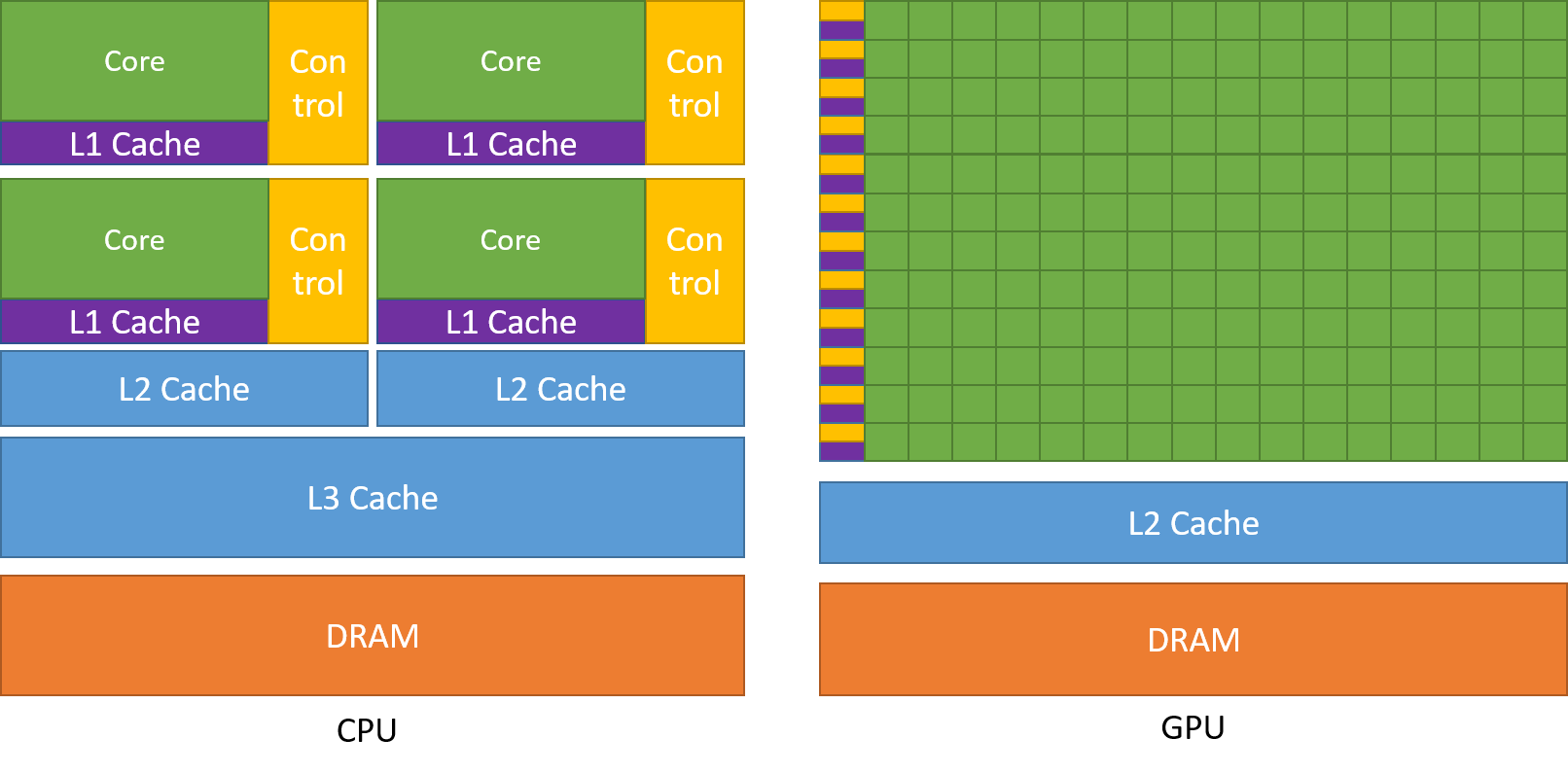
Source: NVIDIA CUDA Programming Guide
| CPU | GPU | |
|---|---|---|
| Core count | 8–128 | 1,000s–10,000s |
| Clock speed | 3–5 GHz | 1.5–2.5 GHz |
| Design goal | Low latency (single thread) | High throughput (many threads) |
| Cache | Large (MB per core) | Small (KB per SM) |
| Control flow | Complex OOO, branch prediction | Simple, in-order per lane |
| Memory BW | ~50–200 GB/s | ~900–3,500 GB/s (HBM) |
The key insight: GPUs hide memory latency by switching to other warps while waiting, not by predicting and prefetching. This requires thousands of in-flight threads.
2. Heterogeneous Programming Model¶
A CUDA application always starts on the CPU (host). The host copies data to the GPU (device), launches kernels, and waits for results.
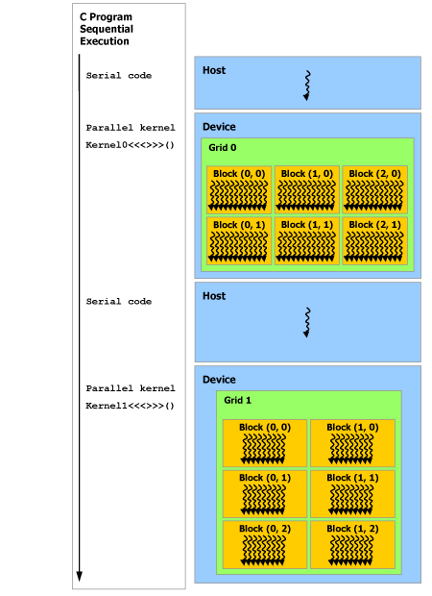
Source: NVIDIA CUDA Programming Guide
time
 │  Host (CPU)                          Device (GPU)
 │  ──────────                          ────────────
 │  Serial code runs here
 │  Allocates device memory
 │  Copies data H→D
 │  Launches kernel ──────────────────────────────────────►
 │  (async — returns immediately)                          Kernel starts
 │  Can do CPU work here                                   Grid of blocks
 │                                                         Threads execute
 │  cudaDeviceSynchronize() ─── blocks ──────────────────────────────────┐
 │                                                         Results in mem │
 ▼  Copies results D→H ◄──────────────────────────────────────────────────┘
Key rules:
- CPU and GPU have separate DRAM — data must be explicitly transferred (unless using Unified Memory)
- Kernel launches are asynchronous — the CPU continues while the GPU works
- cudaDeviceSynchronize() blocks the CPU until all GPU work completes
3. GPU Hardware Architecture¶
3.1 The Full Chip¶
A GPU die is organized as a hierarchy:
GPU Die
└── GPC (Graphics Processing Cluster) × N
    └── TPC (Texture Processing Cluster) × M
        └── SM (Streaming Multiprocessor) × 2
            ├── Warp Schedulers × 4
            ├── Dispatch Units × 8
            ├── CUDA Cores (FP32) × 128
            ├── Tensor Cores × 4
            ├── Register File (256 KB)
            ├── Shared Memory / L1 Cache (up to 228 KB)
            └── Load/Store Units, Special Function Units
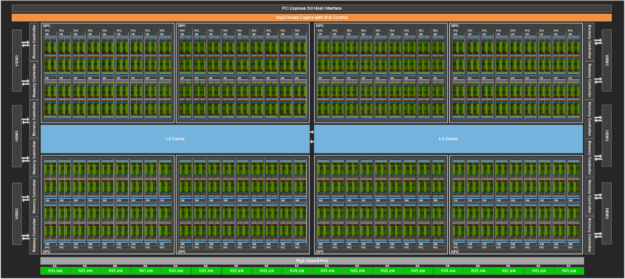
H100 full GPU — 144 SMs organized into GPCs. Source: NVIDIA Hopper Architecture
3.2 The Streaming Multiprocessor (SM)¶
The SM is the fundamental execution unit. All threads in one block run on one SM. The SM executes warps — groups of 32 threads that run the same instruction in lockstep (SIMT).
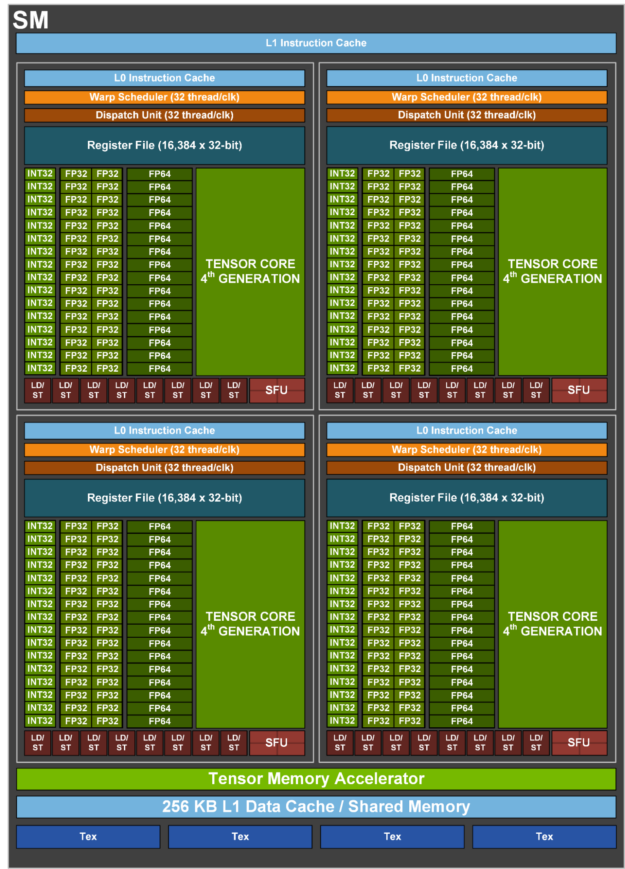
H100 SM: 4 warp schedulers, 128 FP32 CUDA cores, 4 Tensor Cores (4th gen), 256 KB register file, up to 228 KB shared mem / L1. Source: NVIDIA
H100 SM components:
| Component | Count | Role |
|---|---|---|
| Warp schedulers | 4 | Each selects one ready warp per cycle |
| Dispatch units | 8 (2 per scheduler) | Issue instructions to execution units |
| FP32 CUDA cores | 128 | Floating-point arithmetic |
| INT32 units | 64 | Integer arithmetic — runs simultaneously with FP32 |
| Tensor Cores (4th gen) | 4 | Matrix multiply-accumulate (MMA) for ML |
| Register file | 256 KB | Per-thread fastest storage, compiler-allocated |
| Shared mem / L1 | 228 KB | Configurable split between the two |
Execution pipeline — how a kernel actually runs:
kernel launch
     │
     ▼
Threads grouped into warps (32 threads each)
     │
     ▼
Warp Schedulers (×4) — each cycle, pick one ready warp
     │   A warp is "ready" when:
     │     - all operands are available
     │     - no memory stall
     │     - no data dependency
     ▼
Dispatch Units (×8) — issue 2 instructions per scheduler per cycle
     │   → 4 × 2 = up to 8 instructions issued per clock cycle
     ▼
Execution Units
     ├── FP32 cores  — floating-point ops (add, mul, fma)
     ├── INT32 units — integer ops, address calculation  ← runs in parallel with FP32
     └── Tensor Cores — MMA: D = A×B + C in one instruction
     │
     ▼
Register file (results written back per-thread)
Shared memory / L1 (for loads/stores)
Latency hiding — the core GPU performance mechanism:
GPU memory latency is ~hundreds of cycles. Instead of stalling, the scheduler instantly switches to another ready warp:
cycle:   1    2    3    ...  200   201  202
Warp 0:  [issue load] ──── stalled waiting for memory ────► [use result]
Warp 1:       [execute] [execute] [execute] ...
Warp 2:                 [execute] [execute] ...
Warp 3:                           [execute] ...
         ↑
    While warp 0 waits, warps 1–3 fill the execution units — zero idle cycles
This is why GPUs require thousands of in-flight threads: more threads = more warps = more latency hiding capacity. A kernel with too few threads leaves the SM partially idle.
FP32 + INT32 dual execution:
FP32 cores and INT32 units can issue in the same cycle. A common pattern in GPU kernels is computing a float result while simultaneously computing the next memory address:
cycle N:   FP32: result[i] = a[i] * b[i]
           INT32: next_addr = base + (i+1) * stride   ← free — uses different units
Tensor Core operation:
A Tensor Core computes a 16×16 matrix multiply-accumulate in one instruction:
vs CUDA core equivalent: 16×16×16 = 4,096 multiply-adds → 4,096 separate FP32 instructions. One Tensor Core instruction replaces thousands of scalar ops.
Register file and occupancy tradeoff:
256 KB register file shared by all warps on the SM

Thread uses 32 registers:  256 KB / (32 regs × 4 B) = 2048 threads max → 64 warps
Thread uses 64 registers:  256 KB / (64 regs × 4 B) = 1024 threads max → 32 warps
Thread uses 128 registers: 256 KB / (128 regs × 4 B) = 512 threads max → 16 warps

Fewer active warps → less latency hiding → lower occupancy → lower throughput
The compiler minimizes register usage to keep occupancy high. Check with nvcc --ptxas-options=-v to see per-kernel register count.
Shared memory / L1 split (Hopper):
228 KB total ← configurable at kernel launch
├── Shared memory: 0 / 8 / 16 / 32 / 64 / 100 / 132 / 164 / 196 / 228 KB
└── L1 cache:      remainder

More shared memory → better for kernels with thread cooperation (matmul tiling)
More L1            → better for streaming workloads with irregular access
Set with: cudaFuncSetAttribute(kernel, cudaFuncAttributeMaxDynamicSharedMemorySize, size)
Common SM-level bottlenecks:
| Bottleneck | Cause | Fix |
|---|---|---|
| Warp divergence | Threads in same warp take different branches → half the units idle | Restructure code to minimize per-thread branching |
| Memory latency not hidden | Too few warps per SM (low occupancy) | Reduce registers/shared mem per thread, increase block size |
| Register pressure | Too many live variables → spill to local memory (slow) | Reduce variable scope, use __launch_bounds__ |
| Bank conflicts | Multiple threads access same shared memory bank | Pad shared arrays or stagger access patterns |
| Uncoalesced global access | Threads access non-contiguous addresses → multiple transactions | Ensure thread N accesses element N (stride-1 access) |
3.3 Warp Scheduler, L0 Cache, and Dual-Issue¶
Warp scheduler internals:
Each of the 4 schedulers owns a subset of the SM's active warps and runs the same decision loop every clock cycle:
every cycle, for each scheduler:
  1. scan assigned warps
  2. filter: keep only warps where all operands are ready (scoreboard check)
  3. pick one ready warp (typically greedy-then-oldest policy)
  4. issue up to 2 independent instructions from that warp → dispatch units
The scoreboard tracks register readiness. When an instruction is issued, its destination registers are marked "pending". Once the result is written back, the registers are cleared. Any warp that tries to read a pending register is stalled and skipped that cycle — no explicit hardware lock needed.
Warp A issues: r4 = r0 * r1   → r4 marked PENDING
Warp A issues: r5 = r4 + r2   → r4 still PENDING → warp A STALLED
Scheduler     → skips warp A, picks warp B instead (zero-cost switch)
...N cycles later...
r4 result written back → r4 cleared → warp A becomes READY again
Warp pool partitioning (H100 example):
SM: up to 64 warps active (2048 threads ÷ 32)
  Scheduler 0 → warps  0–15
  Scheduler 1 → warps 16–31
  Scheduler 2 → warps 32–47
  Scheduler 3 → warps 48–63
Each scheduler is independent — its stalls do not block the other three.
L0 instruction cache:
Between the warp scheduler and the instruction memory sits a tiny per-scheduler L0 cache. It holds decoded instructions for the active warps assigned to that scheduler.
Warp scheduler
      │
      ▼
  L0 cache (hit → ~0 cycles)
      │ miss
      ▼
  L1 instruction cache
      │ miss
      ▼
  L2 → HBM  (expensive)
L0 is rarely discussed but critical: without it, every instruction issue would require an L1 read, capping throughput. In practice, L0 hit rates are very high because GPU code has high instruction reuse (same loop body issued to thousands of warps).
CUDA core — what it is and isn't:
A CUDA core is a single-precision ALU. It executes one FP32 operation per cycle for one thread's data:
supported: add, mul, fma(a,b,c) = a×b+c, min, max, comparison
not its job: memory loads/stores (load-store units), scheduling (warp scheduler), matrix ops (Tensor Cores)
FMA (fused multiply-add) is the dominant operation in AI workloads — it performs a×b+c in one instruction with a single rounding step, which is both faster and more numerically accurate than separate mul + add.
Threads run in warps of 32. One warp issues one instruction and all 32 threads execute it in parallel across 32 CUDA cores. The SM has 128 cores total, which aligns with the 4 schedulers:
4 schedulers × 1 warp × 32 threads = 128 threads issuing FP32 per cycle
                                   = 128 CUDA cores fully occupied at peak

instruction: C[i] = A[i] * B[i] + D[i]   (FMA, warp of 32 threads)
                 │
    ┌────────────┼─────────────┐
    T0→core 0   T1→core 1  ...  T31→core 31   ← one warp, 32 cores, same cycle
Important — resident warps vs active warps:
Resident warps (H100):  up to 64 per SM  (2048 threads ÷ 32)
                             ↑
          all held in registers, ready to schedule at any time

Active warps per cycle:  4  (one per scheduler)
                             ↑
          the 4 currently issuing instructions this clock cycle

CUDA cores are NOT statically assigned to warps.
Any warp can use any cores — the scheduler dynamically routes each cycle.
Think of it as a flow, not a fixed assignment: the 64 resident warps are a pool the scheduler draws from every cycle, routing whichever 4 are ready into the 128 cores. The large resident pool is what enables latency hiding — while 4 warps execute, 60 others are waiting on memory or dependencies, ready to replace any that stall.
Dual-issue — when two instructions issue in one cycle:
Each warp scheduler can issue up to 2 instructions per cycle to different execution units. This is not two ops on the same unit — it's exploiting independent pipelines simultaneously.
✓  FP32 + INT32       → different pipelines, no conflict
✓  FP32 + load/store  → different units
✓  INT32 + Tensor Core→ different units

✗  FP32 + FP32        → same pipeline, serialized
✗  dependent ops      → second reads register written by first, must wait
Concrete dual-issue example — computing a value while calculating the next index:
cycle N, warp A, instruction slot 1:  r4 = r0 * r1        (FP32 → CUDA cores)
cycle N, warp A, instruction slot 2:  r5 = r2 + 1         (INT32 → integer units)
                                            ↑ free — uses a completely separate pipeline
The compiler (NVCC → ptxas) schedules instruction order to maximize dual-issue opportunities. You can inspect the result with cuobjdump --dump-sass binary.cubin — back-to-back independent FP32+INT32 pairs indicate successful dual-issue scheduling.
Instruction-level vs warp-level parallelism:
warp-level parallelism (TLP):            instruction-level parallelism (ILP):
  many warps in flight                     independent instructions within one warp
  hides memory latency                     fills multiple pipelines per cycle
  requires high occupancy                  requires dependency-free code sequences

  T0 T1 T2 ... T63  ← different warps     x = a*b;   ← FP32
  all in scheduler                         y = c+d;   ← also FP32 (serialized)
  switch on stall                          i = n+1;   ← INT32 (can dual-issue with either)
Both matter. TLP is the primary mechanism (latency hiding); ILP squeezes extra throughput when warps are available.
Cycle-level summary — one SM, one clock:
clock edge
    │
    ├─ Scheduler 0: picks warp A → issues FP32 + INT32 to dispatch units
    ├─ Scheduler 1: picks warp C → issues FP32 to dispatch units (warp B stalled)
    ├─ Scheduler 2: picks warp E → issues Tensor Core op
    └─ Scheduler 3: all warps stalled (memory) → issues nothing this cycle

dispatch units → route to:
    FP32 cores  (×128) → execute 32-thread FMA
    INT32 units (×64)  → execute 32-thread add
    Tensor Core (×4)   → execute 16×16 MMA

register file → results written back → scoreboards updated → stalled warps unblock
Maximum theoretical: 4 schedulers × 2 instructions = 8 instructions issued per clock cycle on one SM.
3.4 Latency Hiding — The Core Magic of GPUs¶
This is the single most important concept in GPU architecture. Once you see it, everything about SM design, occupancy, and kernel optimization clicks.
What "latency" means here:
Every global memory load takes 300–500 cycles to return. On a CPU, that means 300 cycles of doing nothing — the core stalls. On a GPU, the warp scheduler instantly switches to another warp and keeps the hardware busy.
The CPU approach (hide latency with cache):

  Thread requests data → L1 miss → L2 miss → DRAM → 300 cycles stall
                                                      ↑
                                              Core does NOTHING for 300 cycles
                                              (branch predictor + prefetch help, but stalls still happen)

The GPU approach (hide latency with parallelism):

  Warp A requests data → stalls                        ← warp A goes to sleep
  Warp B runs          → stalls                        ← warp B goes to sleep
  Warp C runs          → stalls
  Warp D runs          → computes (no stall!)
  Warp E runs          → computes
  ...
  Warp A's data arrives → warp A runs again            ← warp A wakes up

  SM NEVER IDLES as long as some warp is ready
Step-by-step timeline — what happens inside one SM:
64 resident warps, 4 schedulers, global memory latency = 200 cycles

Cycle 1:    Scheduler 0 picks Warp 0  → issues LOAD from global memory
            Scheduler 1 picks Warp 16 → issues FMA (compute)
            Scheduler 2 picks Warp 32 → issues FMA (compute)
            Scheduler 3 picks Warp 48 → issues LOAD from global memory

Cycle 2:    Warp 0 stalled (waiting for memory)
            Warp 48 stalled (waiting for memory)
            Scheduler 0 picks Warp 1  → issues FMA       ← instantly switched!
            Scheduler 3 picks Warp 49 → issues FMA       ← no idle cycle!

Cycle 3:    Scheduler 0 picks Warp 2  → issues FMA
            ...

Cycle 200:  Warp 0's data arrives from DRAM
            Warp 0 becomes READY again
            Next time Scheduler 0 has a free slot → picks Warp 0

Result: 200 cycles of "waiting" consumed ZERO idle cycles
        because 63 other warps filled the gap
Why warp switching is free:
On a CPU, context switching saves/restores registers to memory (~1000 cycles). On a GPU, every warp's registers are already on-chip in the 256 KB register file — permanently allocated at kernel launch. Switching warps means the scheduler just picks a different warp ID. No save, no restore, no overhead.
CPU context switch:                    GPU warp switch:
  Save 16 registers to stack            Do nothing — registers already on-chip
  Load 16 registers from stack          Scheduler picks different warp ID
  Flush/refill pipeline                 Next cycle: new warp's instruction issues
  ~1000 cycles                          ~0 cycles
This is why the register file is 256 KB — it holds ALL warps' registers simultaneously. The trade-off: more registers per thread = fewer warps can fit = less latency hiding.
The chef analogy:
CPU = one chef, one dish at a time:
  Start soup → wait for stock to boil (300 seconds) → chef stands idle
  Total: 300 seconds of waiting per dish

GPU = one chef, 64 dishes in parallel:
  Start soup     → put on stove (waiting)
  Start salad    → chopping (active)
  Start bread    → kneading (active)
  Start sauce    → simmering (waiting)
  Check soup     → stock ready! Continue soup
  ...
  Chef is NEVER idle — always has another dish to work on

  64 dishes, each takes 300 seconds of waiting
  But chef serves all 64 in ~350 total seconds (not 64 × 300 = 19,200)
When latency hiding fails — and what to do:
| Symptom | Cause | Fix |
|---|---|---|
| SM utilization <50% | Too few warps (low occupancy) | Reduce registers/thread, increase block size |
| All warps stalled simultaneously | Every warp hit the same memory barrier | Restructure access to avoid all-warp synchronization |
| High occupancy but low throughput | Memory bandwidth saturated (all warps waiting on DRAM) | Reduce memory traffic: tile, quantize, fuse ops |
| Occupancy limited by shared memory | Each block uses too much shared memory | Reduce tile size, use registers instead where possible |
| Occupancy limited by registers | Complex kernel needs many registers | Use __launch_bounds__, simplify computations, split kernel |
The occupancy sweet spot:
Occupancy = active warps / max warps (64 on H100)

  Occupancy   Latency hiding   Performance
  ─────────────────────────────────────────
  <25%        Poor              Bad — SM often idle
  25–50%      Adequate          Good for compute-bound kernels
  50–75%      Good              Good for most kernels
  75–100%     Excellent         Best for memory-bound kernels

  Rule of thumb: aim for >50% occupancy as a starting point
  But: high occupancy ≠ fast kernel (memory-bound kernel at 100% occupancy
       is still slow if it's hitting bandwidth ceiling)
Measuring occupancy:
# At compile time: theoretical occupancy
nvcc --ptxas-options=-v my_kernel.cu
# Output: "Used 32 registers, 4096 bytes smem" → plug into occupancy calculator

# At runtime: achieved occupancy
ncu --metrics sm__warps_active.avg.pct_of_peak_sustained_active ./my_program
# Output: 68.5% → 68.5% of max warps were active on average

# NVIDIA Occupancy Calculator (Excel spreadsheet):
# Input: registers/thread, shared mem/block, block size
# Output: theoretical occupancy, limiting factor
The key mental model:
GPUs don't make individual operations faster.
GPUs hide the wait time by doing other work.

1 warp waiting 200 cycles          = 200 wasted cycles
64 warps, each waiting 200 cycles  = 0 wasted cycles (others fill the gap)

This is why:
  - GPU needs THOUSANDS of threads (not 4–8 like CPU)
  - Occupancy matters (more warps = more hiding capacity)
  - Register usage matters (more regs = fewer warps = less hiding)
  - Block size matters (more threads per block = more warps)
  - Memory access pattern matters (coalesced = fewer stalls to hide)
3.5 GPU Architecture Generations¶
| Generation | Architecture | Compute Cap | Key Feature | Example GPU |
|---|---|---|---|---|
| 2017 | Volta | 7.0 | Tensor Cores (1st gen), Independent Thread Scheduling | V100 |
| 2018 | Turing | 7.5 | RT Cores, INT8/INT4 Tensor Cores | RTX 2080 |
| 2020 | Ampere | 8.0 / 8.6 | 3rd gen Tensor Cores, TF32, BF16, MIG, sparsity | A100, RTX 3090 |
| 2022 | Hopper | 9.0 | 4th gen Tensor Cores, TMA, Thread Block Clusters, FP8, Transformer Engine | H100 |
| 2024 | Blackwell | 10.x | 5th gen Tensor Cores, FP4, NVLink 5, confidential compute | B100, B200 |
| 2026 | Vera | 12.x | Vera CPU + Rubin GPU on one package, NVLink 6, FP4/FP6 | Vera |
4. Thread Hierarchy¶
CUDA organizes threads in a 3-level hierarchy: Grid → Block → Thread, with warps as an implicit hardware grouping of 32 threads.
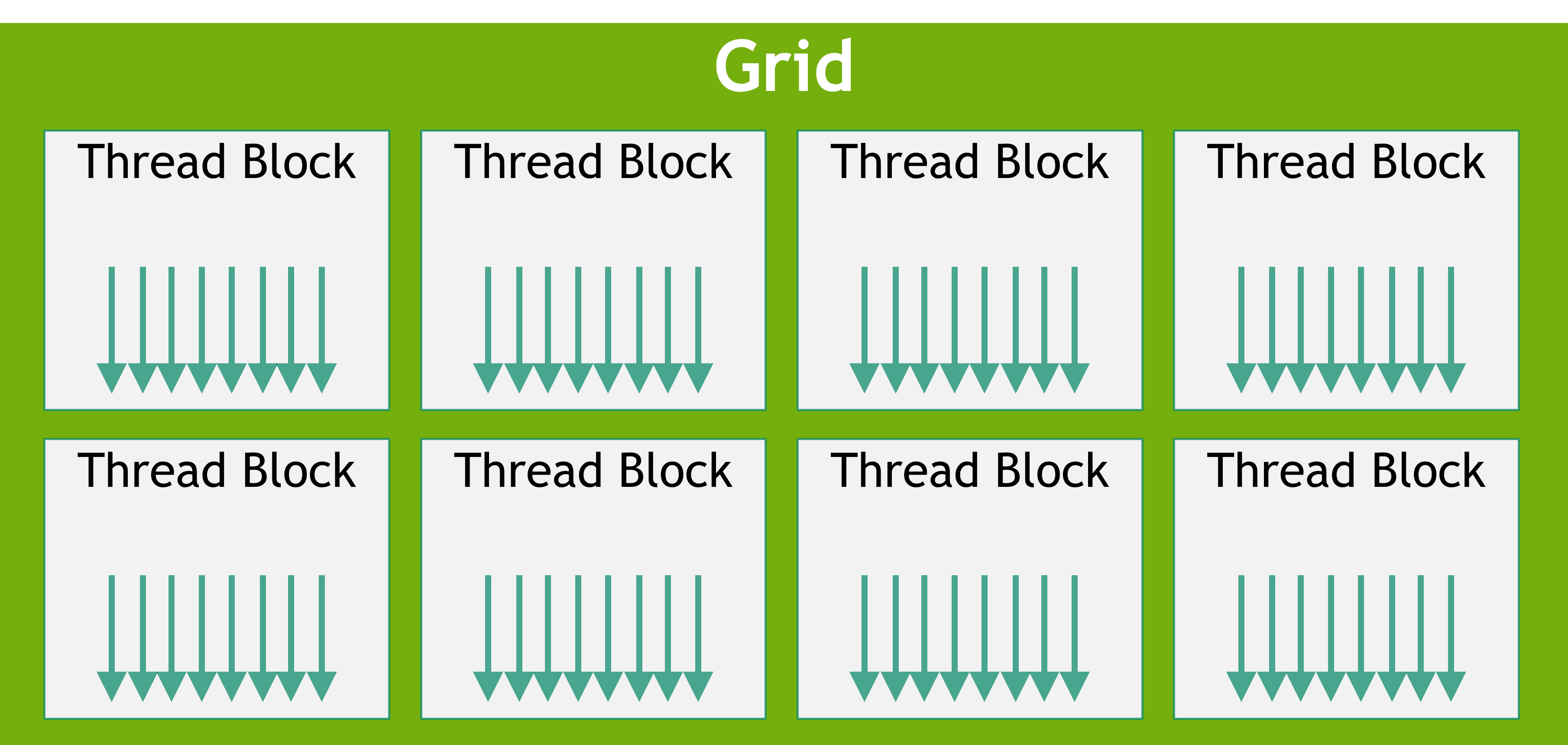
Source: NVIDIA CUDA Programming Guide
4.1 Grid, Block, Warp, Thread¶
Grid  (one per kernel launch)
├── Block (0,0)  ── 1024 threads max ── runs on one SM
│   ├── Warp 0   ── threads 0-31
│   ├── Warp 1   ── threads 32-63
│   └── Warp 31  ── threads 992-1023
├── Block (1,0)
├── Block (0,1)
└── ...
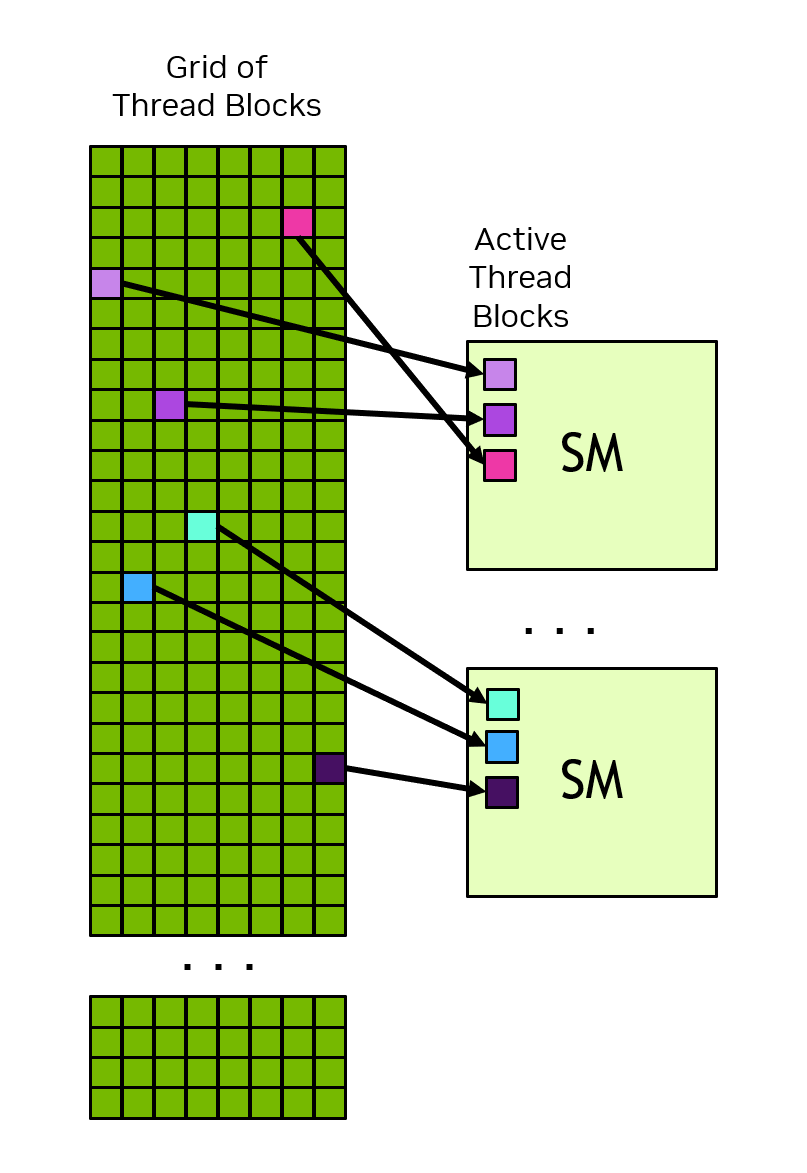
Thread blocks are dispatched to SMs. Multiple blocks can reside on one SM simultaneously (limited by registers, shared memory, and SM capacity). Source: NVIDIA
Built-in variables every kernel sees:
| Variable | Type | Meaning |
|---|---|---|
threadIdx.x/y/z |
uint3 |
Thread index within its block |
blockIdx.x/y/z |
uint3 |
Block index within the grid |
blockDim.x/y/z |
uint3 |
Block dimensions (total threads per block) |
gridDim.x/y/z |
uint3 |
Grid dimensions (total blocks) |
warpSize |
int |
Always 32 |
Compute a global 1D thread ID:
Compute a global 2D thread ID:
4.2 Constraints and Limits¶
Max threads per block:      1024
Max blocks per grid (x):    2,147,483,647
Max shared memory per block: 48 KB (default) → 228 KB (Hopper, if requested)
Max registers per thread:   255
Warp size:                  32  (always)
Block size rule of thumb:
- Must be a multiple of 32 (warp size) — avoid partial warps
- 128, 256, or 512 are common choices
- Use cudaOccupancyMaxPotentialBlockSize() to find the optimal size programmatically
4.3 Thread Block Clusters (Compute Capability 9.0+ / Hopper)¶
Hopper adds a new level between grid and block: clusters — a group of thread blocks that are guaranteed to run on neighbouring SMs simultaneously and can cooperate directly.
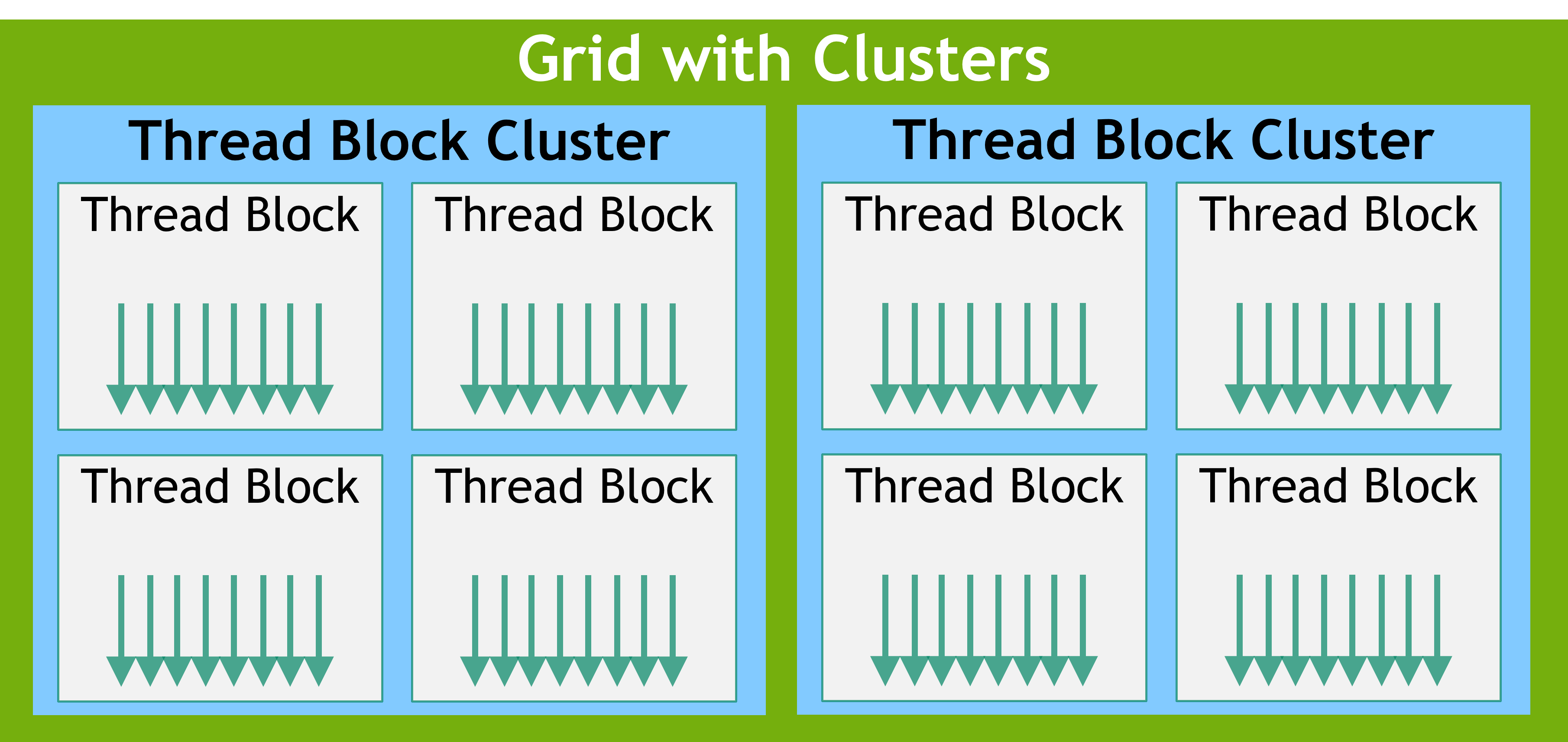
Thread Block Clusters: multiple blocks scheduled simultaneously on the same GPC, sharing distributed shared memory. Source: NVIDIA
Before clusters — blocks are independent:
Grid
├── Block 0 → SM 5   (wherever the scheduler puts it)
├── Block 1 → SM 71  (no control over placement)
├── Block 2 → SM 12
└── Block 3 → SM 99
Communication between blocks: global memory only (~400 cycles) ❌
Synchronization between blocks: impossible without kernel relaunch ❌
With clusters — blocks form coordinated teams:
Grid
├── Cluster 0
│   ├── Block 0 → SM 0  ← guaranteed on neighbouring SMs
│   ├── Block 1 → SM 1  ← can share memory directly
│   ├── Block 2 → SM 2  ← can synchronize
│   └── Block 3 → SM 3
├── Cluster 1
│   ├── Block 4 → SM 4
│   └── ...
Three new capabilities:
| Capability | Before clusters | With clusters |
|---|---|---|
| Cross-block sync | Impossible | cluster.sync() barrier |
| Cross-block memory | Global memory only (~400 cycles) | Distributed Shared Memory (~30 cycles) |
| Co-scheduling | No guarantee | Guaranteed on neighbouring SMs |
Launching with Clusters¶
// Hopper cluster launch (compute capability 9.0+)
__global__ void __cluster_dims__(2, 1, 1) my_kernel(float* data) {
    // This kernel runs with 2 blocks per cluster
    // Access cluster info:
    namespace cg = cooperative_groups;
    auto cluster = cg::this_cluster();

    unsigned int cluster_rank = cluster.block_rank();  // 0 or 1 in this cluster
    unsigned int cluster_size = cluster.num_blocks();   // 2

    // ... do work ...

    // Synchronize all blocks in the cluster
    cluster.sync();  // ← impossible without clusters!
}

// Alternative: runtime configuration
cudaLaunchConfig_t config = {};
config.gridDim = grid;
config.blockDim = block;

cudaLaunchAttribute attr;
attr.id = cudaLaunchAttributeClusterDimension;
attr.val.clusterDim = {2, 1, 1};   // 2 blocks per cluster
config.attrs = &attr;
config.numAttrs = 1;

cudaLaunchKernelEx(&config, my_kernel, args...);
Distributed Shared Memory (DSM)¶
This is the most powerful cluster feature. Blocks in a cluster can read/write each other's shared memory directly — no global memory round-trip.
Without DSM:
  Block 0 (SM 0):  shared mem = 228 KB   ← only Block 0 can access
  Block 1 (SM 1):  shared mem = 228 KB   ← only Block 1 can access
  Exchange data:   Block 0 → global mem → Block 1  (400+ cycles)

With DSM (cluster of 4 blocks):
  Block 0 (SM 0):  shared mem = 228 KB ─┐
  Block 1 (SM 1):  shared mem = 228 KB  ├─ ALL blocks see ALL 912 KB
  Block 2 (SM 2):  shared mem = 228 KB  │  via distributed shared memory
  Block 3 (SM 3):  shared mem = 228 KB ─┘
  Exchange data:   Block 0 → DSM → Block 1  (~30 cycles via SM-to-SM interconnect)
Effective shared memory per cluster: 4 × 228 KB = 912 KB — enough to hold much larger tiles.
__global__ void __cluster_dims__(4, 1, 1) dsm_kernel(float* data) {
    namespace cg = cooperative_groups;
    auto cluster = cg::this_cluster();

    __shared__ float tile[TILE_SIZE];

    // Each block loads its own tile
    load_tile(tile, data, blockIdx.x);

    cluster.sync();  // ensure all blocks have loaded

    // NOW: Block 0 can read Block 1's shared memory!
    unsigned int target_block = (cluster.block_rank() + 1) % cluster.num_blocks();
    float* remote_tile = cluster.map_shared_rank(tile, target_block);

    // remote_tile points to the OTHER block's shared memory
    // Access it at ~30 cycles (vs ~400 for global memory)
    float val = remote_tile[threadIdx.x];
}
DSM Latency Comparison¶
| Memory | Latency | Bandwidth | Scope |
|---|---|---|---|
| Registers | 0 cycles | Unlimited | Per-thread |
| Shared memory (local) | ~5 cycles | ~128 B/cycle/SM | Per-block |
| Distributed Shared Memory | ~30 cycles | ~32 B/cycle/SM | Per-cluster |
| L2 cache | ~100 cycles | ~12 TB/s total | All SMs |
| Global (HBM) | ~400 cycles | ~3.35 TB/s | All SMs |
DSM is ~13× faster than global memory. Not as fast as local shared memory, but fast enough to enable cross-block cooperation without the global memory penalty.
Cluster Size Constraints¶
| Cluster size | Total shared mem | Use case |
|---|---|---|
| 1 block (no cluster) | 228 KB | Default, backwards compatible |
| 2 blocks | 456 KB | Small cross-block cooperation |
| 4 blocks | 912 KB | Sweet spot for attention tiling |
| 8 blocks | 1824 KB | Large tiles, high SM occupancy cost |
| 16 blocks (max) | 3648 KB | Rare, requires many free SMs |
Trade-off: larger clusters reserve more SMs → fewer clusters can run simultaneously → potential occupancy loss. Typically 2–8 blocks per cluster is optimal.
4.4 Tiling — The Universal GPU Optimization¶
Tiling is the single most important optimization pattern in GPU computing. Every high-performance AI kernel (matmul, attention, convolution) is fundamentally a tiled algorithm.
The core idea: break a large problem into small tiles that fit in fast on-chip memory (shared memory / registers), compute on each tile, then move to the next.
Without tiling:                          With tiling:

  For each output element:                For each tile:
    Read inputs from global memory          Load tile into shared memory (1 read)
    Compute                                 Compute on tile (many reuses)
    Write output to global memory           Load next tile
                                            Write final output (1 write)
  Every element = separate DRAM access
  = SLOW                                  Each value loaded once, used many times
                                          = FAST
Why it works — data reuse:
Tiled matmul: C = A × B,  tile size T = 16

Without tiling:
  Each C[i,j] reads A[i, 0..N] and B[0..N, j] from DRAM
  Total reads: 2 × N per output element
  For N=4096: 8192 DRAM reads per element ❌

With tiling:
  Load 16×16 tile of A into shared memory → reused by 16 threads
  Load 16×16 tile of B into shared memory → reused by 16 threads
  Total DRAM reads per element: 2 × N/T = 2 × 4096/16 = 512
  That's 16× fewer DRAM reads ✓

  With T=32:  256× reduction
  With T=64:  4096× reduction (limited by shared memory size)
Thread block = tile:
One thread block handles one output tile.
Threads cooperatively load data into shared memory.
Each thread computes one element of the output tile.

Block (16×16 = 256 threads)
  ├── Threads 0–15:   load row 0 of tile A, row 0 of tile B
  ├── Threads 16–31:  load row 1...
  ├── ...
  └── __syncthreads() → all data in shared memory → compute
This is why block size, shared memory size, and tile size are so tightly coupled.
Tiling hierarchy on modern GPUs:
Level 0: Register tiling
  Each thread holds a small tile (e.g., 4×4) in registers
  Fastest: 0 cycles, unlimited bandwidth
  Used by: CUTLASS, cuBLAS inner loops

Level 1: Shared memory tiling (per block)
  Thread block loads tile into shared memory (48–228 KB)
  ~5 cycles, shared among threads in block
  Used by: standard tiled matmul, FlashAttention

Level 2: Distributed shared memory tiling (per cluster, Hopper)
  Cluster of blocks shares DSM (up to ~1 MB)
  ~30 cycles, shared among blocks in cluster
  Used by: Hopper-optimized FlashAttention, large attention tiles

Level 3: L2 cache tiling
  Multiple blocks' access patterns designed to hit L2 (40–50 MB)
  ~100 cycles, shared across all SMs
  Used by: persistent kernels, stream-K GEMM
4.5 Tiling for AI Workloads¶
Every AI operation maps to a tiled computation. Understanding this mapping is the bridge from CUDA programming to AI accelerator design.
Matrix Multiply (GEMM) — The Foundation¶
C[M×N] = A[M×K] × B[K×N]

Tile: each block computes a TILE_M × TILE_N output tile

  ┌────────────────────┐         ┌────────────────────┐
  │ A                  │         │ B                  │
  │ ┌──────┐           │         │ ┌──────┐           │
  │ │Tile A│→ load to  │         │ │Tile B│→ load to  │
  │ │TILE_M│  shared   │         │ │TILE_K│  shared   │
  │ │×     │  memory   │         │ │×     │  memory   │
  │ │TILE_K│           │         │ │TILE_N│           │
  │ └──────┘           │         │ └──────┘           │
  └────────────────────┘         └────────────────────┘

  Output: C[TILE_M × TILE_N] = Σ_k (TileA × TileB)

  Iterate over K dimension in chunks of TILE_K.
  Each iteration: 1 load from DRAM, many multiplies from shared memory.
This is exactly what cuBLAS and CUTLASS do — with additional optimizations: double-buffering (load next tile while computing current), register tiling (each thread handles a 4×4 sub-tile), and Tensor Core wmma instructions.
Attention — FlashAttention Tiling¶
Attention is the bottleneck of every transformer. FlashAttention solves it with tiling:
Standard attention (materializes full matrix):

  S = Q × K^T           (seq × seq matrix — huge!)
  P = softmax(S)         (still seq × seq)
  O = P × V              (output)

  Memory: O(seq²) — for seq=4096, that's 64 MB in FP16
  Problem: doesn't fit in shared memory, tons of DRAM traffic

FlashAttention (tiled, never materializes full matrix):

  For each Q tile (TILE_Q rows of Q):
    For each K/V tile (TILE_KV columns of K, rows of V):
      Load Q tile into shared memory
      Load K tile into shared memory
      S_tile = Q_tile × K_tile^T           (small: TILE_Q × TILE_KV)
      P_tile = online_softmax(S_tile)       (computed incrementally!)
      Load V tile into shared memory
      O_tile += P_tile × V_tile            (accumulate in registers)
    Write O_tile to global memory

  Memory: O(seq) — only tiles in shared memory at any time
  DRAM traffic: ~4× less than standard attention
FlashAttention data flow through memory:

  Global memory (HBM)
        │
        ├── Load Q tile ──────►  Shared memory
        ├── Load K tile ──────►  Shared memory
        │                            │
        │                       Compute S = Q × K^T
        │                       (stays in registers)
        │                            │
        │                       Compute softmax(S)
        │                       (online, incremental)
        │                            │
        ├── Load V tile ──────►  Shared memory
        │                            │
        │                       Compute O += P × V
        │                       (accumulate in registers)
        │                            │
        └── Write O tile ◄──── Registers
                                (only final output touches DRAM)
Why FlashAttention is so important on Jetson: Jetson's 51 GB/s bandwidth is the bottleneck. FlashAttention reduces DRAM traffic by ~4× for attention, which directly translates to ~4× faster attention.
Convolution — im2col + GEMM Tiling¶
CNNs use the same tiling through a clever trick: im2col converts convolution into matrix multiplication, then cuBLAS tiled GEMM handles it:
Input image: [batch × channels × height × width]
Kernel: [out_channels × in_channels × kH × kW]

im2col: unfold image patches into a matrix
  Each patch (kH × kW × channels) becomes one column
  Result: [patch_size × num_patches] matrix

Now: convolution = matrix multiply (patches × kernels)
  → cuBLAS tiled GEMM → Tensor Cores → maximum throughput
Tensor Parallelism — Tiling Across GPUs¶
For models too large for one GPU (or one Jetson), tensor parallelism splits weight matrices across devices:
Single GPU:
  Y = X × W                    (W is too large for one GPU)

Tensor parallel (4 GPUs):
  W split column-wise: W = [W₀ | W₁ | W₂ | W₃]

  GPU 0: Y₀ = X × W₀
  GPU 1: Y₁ = X × W₁          ← each GPU computes partial output
  GPU 2: Y₂ = X × W₂
  GPU 3: Y₃ = X × W₃

  All-gather: Y = [Y₀ | Y₁ | Y₂ | Y₃]   ← combine over NVLink/PCIe
On Jetson, tensor parallelism isn't applicable (single GPU), but the concept maps directly to the GPU+DLA split:
Jetson "parallelism":
  DLA: runs conv/pool layers (subset of model)
  GPU: runs attention/custom layers

  Same output buffer shared via unified memory — zero-copy handoff
  Both engines consume bandwidth from the same 51 GB/s pipe
How Clusters Enable Bigger Attention Tiles (Hopper)¶
Standard FlashAttention is limited by one block's shared memory (~228 KB). With clusters:
Standard (1 block, 228 KB shared mem):
  Q tile: 64 tokens × 128 dims × 2 bytes = 16 KB
  K tile: 64 tokens × 128 dims × 2 bytes = 16 KB
  V tile: 64 tokens × 128 dims × 2 bytes = 16 KB
  Workspace: ~50 KB
  Total: ~98 KB  (fits in 228 KB ✓)

Cluster of 4 blocks (912 KB distributed shared mem):
  Q tile: 256 tokens × 128 dims × 2 bytes = 64 KB
  K tile: 256 tokens × 128 dims × 2 bytes = 64 KB
  V tile: 256 tokens × 128 dims × 2 bytes = 64 KB
  Workspace: ~200 KB
  Total: ~392 KB  (needs cluster DSM ✓)

  Bigger tiles = more data reuse = fewer DRAM reads = faster
  4× larger tiles → up to 4× less memory traffic
This is why Hopper FlashAttention-3 is significantly faster than Ampere FlashAttention-2 — it's not just faster Tensor Cores, it's bigger tiles via clusters.
4.6 The Tiling Mental Model¶
Level              Unit            Fast memory        Tile size
──────────────────────────────────────────────────────────────────
Thread             registers       registers          2×2 – 8×8
Warp               warp shuffles   register file      32-wide
Block              thread block    shared memory      16×16 – 64×64
Cluster (Hopper)   block cluster   distributed SM     64×64 – 256×256
SM array           all SMs         L2 cache           entire matrix dimension
Multi-GPU          GPUs            NVLink/PCIe        tensor parallel split

Each level follows the same principle:
  1. Load data into the fast memory at this level
  2. Reuse it as many times as possible
  3. Only go to the next (slower) level when this level is exhausted
4.7 Inside One SM — Tiled Matmul Step by Step¶
Everything above is theory. This section zooms into what actually happens inside a single SM during a tiled matrix multiplication — cycle by cycle, warp by warp.
Setup: one thread block computing a 128×128 output tile of C = A × B. K dimension processed in chunks of 32. Block has 256 threads = 8 warps.
Step 1: Block Arrives at the SM¶
The hardware scheduler assigns the block to an SM. The SM allocates:
Resources locked for this block:
  Registers:     256 threads × 32 regs × 4 bytes = 32 KB  (from 256 KB file)
  Shared memory: 128×32 + 32×128 = 8K elements × 2 bytes = 16 KB  (from 48 KB)
  Warp slots:    8 warps                                    (from 48 max)

Remaining SM capacity: other blocks can co-reside if resources allow
Step 2: Threads Grouped into Warps¶
256 threads → 8 warps:
  Warp 0: threads   0– 31    Warp 4: threads 128–159
  Warp 1: threads  32– 63    Warp 5: threads 160–191
  Warp 2: threads  64– 95    Warp 6: threads 192–223
  Warp 3: threads  96–127    Warp 7: threads 224–255

4 warp schedulers manage these 8 warps.
Each cycle, each scheduler picks one ready warp → 4 warps active per cycle.
Step 3: Cooperative Tile Loading¶
Every thread participates in loading the tile — no single thread does all the work:
A tile [128×32] = 4,096 elements   →  256 threads each load 16 elements
B tile [32×128] = 4,096 elements   →  256 threads each load 16 elements

Memory access pattern (coalesced):
  Warp 0: loads A[row 0..3,  col 0..31]   32 threads × 4 rows = 128 bytes/thread
  Warp 1: loads A[row 4..7,  col 0..31]
  ...
  Warp 4: loads B[row 0..3,  col 0..127]  (same pattern for B)
  ...

All loads are coalesced: consecutive threads access consecutive addresses.
32 threads × 4 bytes = 128 bytes → one memory transaction.
Why this is fast: each value is loaded from DRAM once (slow, ~300 cycles), then read from shared memory many times (fast, ~5 cycles). For a 128×128 tile with K=32: each A element is reused 128 times, each B element is reused 128 times.
Step 4: Synchronization Barrier¶
Without this barrier: some warps start computing before the tile is fully loaded → wrong results. The barrier ensures all 8,192 elements are in shared memory before math begins.
Step 5: Each Warp Gets a Subtile¶
The 128×128 output tile is divided among warps:
Output tile [128×128]:
  ┌────────┬────────┐
  │ Warp 0 │ Warp 1 │     Each warp computes a 64×32 subtile
  │ 64×32  │ 64×32  │     (or similar partitioning)
  ├────────┼────────┤
  │ Warp 2 │ Warp 3 │     Within each warp:
  │ 64×32  │ 64×32  │       each thread handles a 4×4 sub-subtile
  ├────────┼────────┤       in REGISTERS (not shared memory)
  │ Warp 4 │ Warp 5 │
  ├────────┼────────┤
  │ Warp 6 │ Warp 7 │
  └────────┴────────┘
Step 6A: CUDA Core Execution¶
Each thread performs scalar FMA (fused multiply-add) operations:
Thread's inner loop (K chunk = 32):
  for k = 0 to 31:
    acc[0][0] += shared_A[my_row + 0][k] * shared_B[k][my_col + 0]
    acc[0][1] += shared_A[my_row + 0][k] * shared_B[k][my_col + 1]
    acc[1][0] += shared_A[my_row + 1][k] * shared_B[k][my_col + 0]
    acc[1][1] += shared_A[my_row + 1][k] * shared_B[k][my_col + 1]

  acc[4][4] in registers = 16 accumulators per thread
  32 K iterations × 16 FMAs = 512 FMA ops per thread per K chunk
  256 threads × 512 = 131,072 FMAs per block per K chunk
All accumulators live in registers — the fastest storage. No DRAM writes until the entire K dimension is processed.
Step 6B: Tensor Core Execution¶
Instead of scalar FMAs, a warp issues matrix-multiply-accumulate (MMA) instructions:
Tensor Core MMA instruction:
  D[16×8] = A[16×8] × B[8×8] + C[16×8]

  One instruction = 16 × 8 × 8 = 1,024 multiply-adds
  vs CUDA core: 1 FMA per instruction

Each warp issues multiple MMA instructions to cover its subtile:
  64×32 warp tile / 16×8 MMA tile = 16 MMA instructions per K step

Throughput: 16 × 1,024 = 16,384 ops per warp per K step
  vs CUDA cores: 32 threads × 1 = 32 ops per cycle
  → Tensor Cores are ~500× higher throughput per instruction
Step 7: Advance Through K Dimension¶
After finishing one K chunk (32 elements):
K = 0..31:    load A[128×32], B[32×128] → compute → accumulate in registers
K = 32..63:   load A[128×32], B[32×128] → compute → add to SAME registers
K = 64..95:   load A[128×32], B[32×128] → compute → add to SAME registers
...
K = N-32..N:  final chunk → registers hold complete C[128×128]

Registers accumulate: C[i,j] = Σ_k A[i,k] × B[k,j]
                       built up across all K chunks
Step 8: Final Store¶
Registers → global memory (DRAM)

256 threads cooperatively write 128×128 = 16,384 elements to C.
Each thread writes its 4×4 subtile (16 elements).
Writes are coalesced: consecutive threads write consecutive addresses.
What Happens Every Cycle (Zoomed In)¶
Clock cycle N:
  Scheduler 0: Warp 2 → issues LOAD from shared memory
  Scheduler 1: Warp 5 → issues FMA (or Tensor Core MMA)
  Scheduler 2: Warp 0 → issues LOAD from global memory (prefetch next tile)
  Scheduler 3: Warp 7 → stalled (waiting for global load) → SKIP

Clock cycle N+1:
  Scheduler 0: Warp 2 → issues FMA (data arrived from shared mem)
  Scheduler 1: Warp 5 → issues FMA (next accumulation)
  Scheduler 2: Warp 1 → issues LOAD from shared memory
  Scheduler 3: Warp 3 → issues FMA

Latency hiding: while Warp 7 waits for DRAM (300 cycles),
  warps 0–6 execute ~300 × 4 = 1,200 instructions across the 4 schedulers.
  SM never idles.
Double Buffering — Overlap Load and Compute¶
Elite kernels (cuBLAS, CUTLASS) load the next tile while computing the current tile:
Time:   ───────────────────────────────────────────────────────►

Load:   [Tile 0 load]  [Tile 1 load]  [Tile 2 load]  [Tile 3 load]
                    ↘              ↘              ↘
Compute:           [Tile 0 compute][Tile 1 compute][Tile 2 compute]

Without double buffering:
  [Load 0][Compute 0][Load 1][Compute 1][Load 2][Compute 2]
  ← gaps where SM waits for memory

With double buffering:
  Load and compute overlap → nearly 100% SM utilization
Requires two shared memory buffers (one being loaded, one being computed on). Uses 2× shared memory but hides all load latency.
CUTLASS Tiling Hierarchy¶
Production GEMM libraries organize tiles in nested levels:
Threadblock tile [128×128×32]       ← one thread block's output + K chunk
  └── Warp tile [64×64]            ← one warp's output portion
        └── MMA tile [16×8×8]      ← one Tensor Core instruction
              └── Thread tile [4×4] ← one thread's register accumulators

Each level maps to a different memory/compute resource:
  Threadblock tile → shared memory (load from DRAM)
  Warp tile        → register file (computed in registers)
  MMA tile         → Tensor Core hardware instruction
  Thread tile      → individual thread's registers
This nested structure is why CUTLASS code looks complex — but it's just the same tiling idea applied recursively at every level of the hardware hierarchy.
Real Bottlenecks in Tiled Matmul¶
| Bottleneck | Cause | Symptom | Fix |
|---|---|---|---|
| Bank conflicts | Multiple threads hit same shared memory bank | Shared mem throughput drops 2–32× | Pad: __shared__ float A[128][33] (not 32) |
| Register pressure | Too many accumulators → spill to local memory | ptxas reports spills |
Reduce thread tile size (4×4 → 2×2) |
| Low occupancy | Large shared mem + many registers → few blocks per SM | SM utilization < 50% | Reduce tile size or shared mem usage |
| Uncoalesced global loads | Threads access non-contiguous DRAM addresses | Memory throughput < 50% peak | Ensure thread N loads address N (stride-1) |
| Shared memory bottleneck | Compute is faster than shared memory can deliver data | Compute units idle | Use register tiling to reuse data from shared mem |
5. Writing Kernels¶
5.1 Function Qualifiers¶
// Runs on GPU, called from CPU (kernel)
__global__ void my_kernel(float* a, float* b, float* c, int N);

// Runs on GPU, called from GPU only
__device__ float helper(float x);

// Runs on CPU (default)
void host_function();

// Compiles for both CPU and GPU
__host__ __device__ float clamp(float x, float lo, float hi) {
    return x < lo ? lo : (x > hi ? hi : x);
}
5.2 Launching a Kernel¶
// Syntax: kernel<<<grid_dim, block_dim, shared_mem_bytes, stream>>>(args)

int N = 1 << 20;   // 1M elements
int block_size = 256;
int grid_size = (N + block_size - 1) / block_size;  // ceil division

saxpy<<<grid_size, block_size>>>(a, b, c, N);

// 2D launch for matrix ops
dim3 block(16, 16);         // 256 threads per block
dim3 grid((W + 15) / 16, (H + 15) / 16);

matmul<<<grid, block>>>(A, B, C, M, N, K);
5.3 Complete SAXPY Example¶
#include <cuda_runtime.h>
#include <cstdio>

// Kernel: c[i] = alpha * a[i] + b[i]
__global__ void saxpy(float alpha, const float* a, const float* b, float* c, int N) {
    int i = blockIdx.x * blockDim.x + threadIdx.x;
    if (i < N)   // bounds check — last block may be partial
        c[i] = alpha * a[i] + b[i];
}

int main() {
    const int N = 1 << 20;
    const size_t bytes = N * sizeof(float);

    // Allocate host memory
    float *h_a = new float[N], *h_b = new float[N], *h_c = new float[N];
    for (int i = 0; i < N; i++) { h_a[i] = 1.0f; h_b[i] = 2.0f; }

    // Allocate device memory
    float *d_a, *d_b, *d_c;
    cudaMalloc(&d_a, bytes);
    cudaMalloc(&d_b, bytes);
    cudaMalloc(&d_c, bytes);

    // Copy H → D
    cudaMemcpy(d_a, h_a, bytes, cudaMemcpyHostToDevice);
    cudaMemcpy(d_b, h_b, bytes, cudaMemcpyHostToDevice);

    // Launch
    int block = 256;
    int grid  = (N + block - 1) / block;
    saxpy<<<grid, block>>>(2.0f, d_a, d_b, d_c, N);

    // Copy D → H
    cudaMemcpy(h_c, d_c, bytes, cudaMemcpyDeviceToHost);

    // Verify
    for (int i = 0; i < N; i++) {
        if (h_c[i] != 4.0f) { printf("WRONG at %d\n", i); break; }
    }
    printf("OK: c[0] = %.1f\n", h_c[0]);   // expected: 4.0

    cudaFree(d_a); cudaFree(d_b); cudaFree(d_c);
    delete[] h_a; delete[] h_b; delete[] h_c;
}
5.4 Error Checking¶
// Macro to check any CUDA call
#define CUDA_CHECK(call) do {                                    \
    cudaError_t err = (call);                                    \
    if (err != cudaSuccess) {                                    \
        fprintf(stderr, "CUDA error at %s:%d — %s\n",           \
                __FILE__, __LINE__, cudaGetErrorString(err));    \
        exit(1);                                                 \
    }                                                            \
} while(0)

// Usage
CUDA_CHECK(cudaMalloc(&d_a, bytes));
CUDA_CHECK(cudaMemcpy(d_a, h_a, bytes, cudaMemcpyHostToDevice));

// Check kernel errors (kernels don't return error codes)
my_kernel<<<grid, block>>>(args);
CUDA_CHECK(cudaGetLastError());       // check launch error
CUDA_CHECK(cudaDeviceSynchronize());  // wait + check execution error
Always check errors in development. Suppress
cudaDeviceSynchronize()in production (it blocks the CPU) but keepcudaGetLastError().
6. Memory Spaces¶
Every variable in CUDA lives in a specific memory space. Understanding this is the most important skill for optimization.
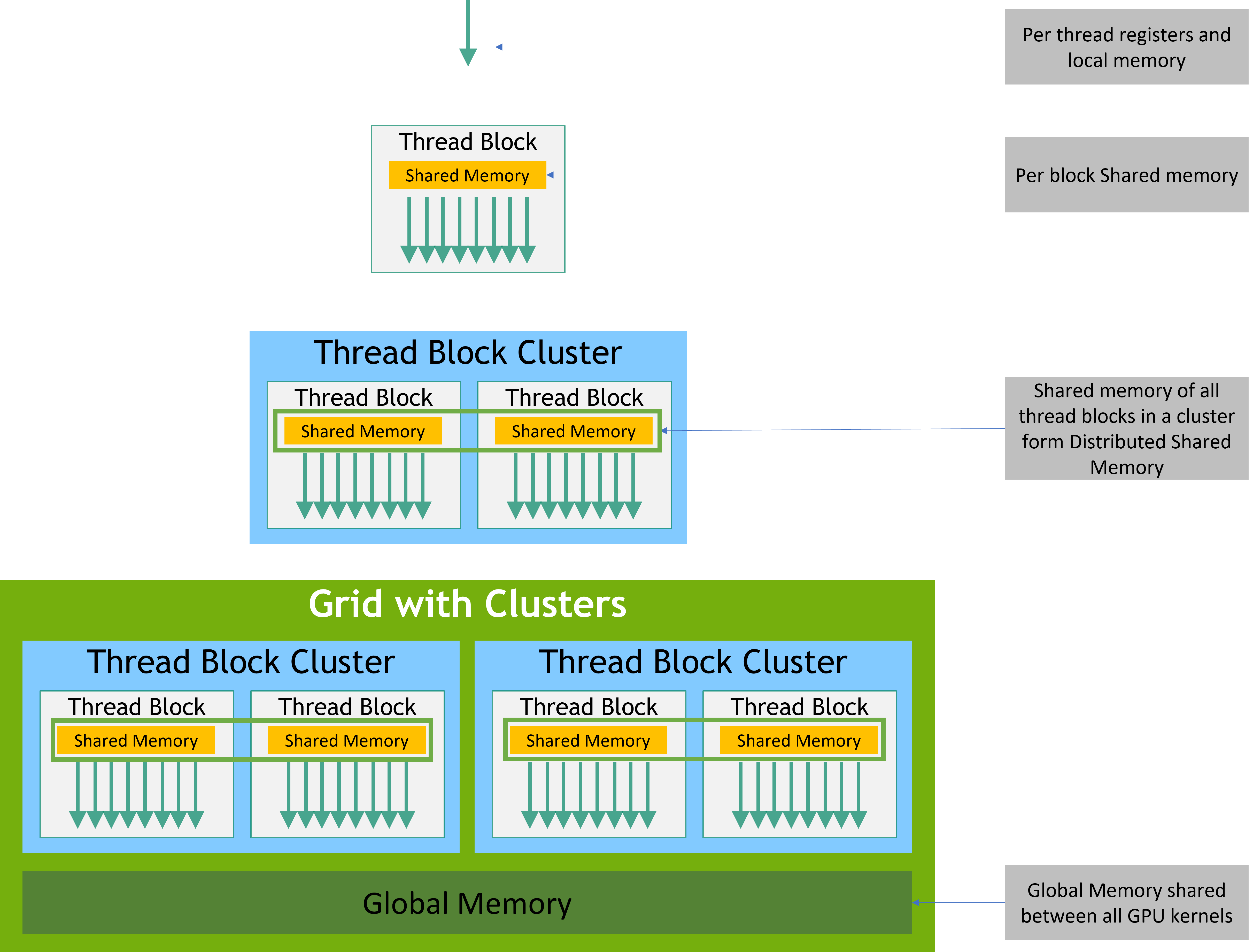
Source: NVIDIA CUDA Programming Guide
6.1 Memory Space Summary¶
| Memory | Location | Scope | Lifetime | Latency | Bandwidth | Size |
|---|---|---|---|---|---|---|
| Register | On-chip (SM) | 1 thread | Kernel | 0 cycles | N/A | 256 KB/SM |
| Local | Off-chip (DRAM) | 1 thread | Kernel | ~600 cycles | ~same as global | Per thread |
| Shared | On-chip (SM) | All threads in block | Kernel | ~20–40 cycles | ~19 TB/s (H100) | Up to 228 KB/SM |
| L1 cache | On-chip (SM) | 1 SM | Automatic | ~20–40 cycles | Same as shared | Part of unified cache |
| L2 cache | On-chip (GPU) | All SMs | Automatic | ~200 cycles | ~TB/s | 50 MB (H100) |
| Global | Off-chip (HBM) | All threads | Application | ~600 cycles | ~3.35 TB/s (H100) | ~80 GB |
| Constant | Off-chip (cached) | All threads (read-only) | Application | ~20 cycles (cached) | — | 64 KB |
| Texture | Off-chip (cached) | All threads (read-only) | Application | ~20 cycles (cached) | — | Up to 2D |
6.2 Register and Local Memory¶
__global__ void kernel() {
    int x = 5;        // register (fast, private per thread)
    float arr[10];    // may spill to local memory if too large
    // local memory = per-thread DRAM — very slow, avoid large on-stack arrays
}
Register spilling: If a thread uses too many registers, the compiler stores the overflow in slow local memory (off-chip DRAM). Detect with nvcc --ptxas-options=-v.
6.3 Shared Memory¶
Shared memory is the most important optimization tool in CUDA. All threads in a block share it, it's on-chip, and it's ~30× faster than global memory.
__global__ void use_shared(float* in, float* out, int N) {
    __shared__ float tile[256];   // allocated at compile time

    int tid = threadIdx.x;
    int gid = blockIdx.x * blockDim.x + threadIdx.x;

    // Load from global into shared
    tile[tid] = (gid < N) ? in[gid] : 0.0f;
    __syncthreads();   // ← CRITICAL: all threads must finish loading

    // Now process from shared (fast)
    tile[tid] = tile[tid] * 2.0f;
    __syncthreads();

    // Write back to global
    if (gid < N) out[gid] = tile[tid];
}
Dynamic shared memory (size determined at launch):
__global__ void kernel(float* data) {
    extern __shared__ float smem[];   // size determined at launch
    smem[threadIdx.x] = data[...];
    // ...
}

// Launch: third argument = shared memory bytes
kernel<<<grid, block, 256 * sizeof(float)>>>(data);
Request more than 48 KB per block:
// Required for > 48 KB shared memory (Ampere+)
cudaFuncSetAttribute(my_kernel,
    cudaFuncAttributeMaxDynamicSharedMemorySize,
    96 * 1024);  // 96 KB

my_kernel<<<grid, block, 96 * 1024>>>(args);
6.4 Global Memory Allocation¶
float *d_data;
cudaMalloc(&d_data, N * sizeof(float));   // allocate
cudaFree(d_data);                          // free

// Transfers
cudaMemcpy(d_data, h_data, bytes, cudaMemcpyHostToDevice);   // H→D
cudaMemcpy(h_data, d_data, bytes, cudaMemcpyDeviceToHost);   // D→H
cudaMemcpy(d_dst, d_src,   bytes, cudaMemcpyDeviceToDevice); // D→D

// Zero-initialize
cudaMemset(d_data, 0, bytes);
Pinned (page-locked) host memory — faster H↔D transfers:
float *h_data;
cudaMallocHost(&h_data, bytes);   // allocate pinned host memory
// OR: cudaHostAlloc(&h_data, bytes, cudaHostAllocDefault);

// Use exactly like regular memory
// Transfer speed: ~2× faster than pageable memory

cudaFreeHost(h_data);
Unified Memory — single pointer accessible from both CPU and GPU:
float *data;
cudaMallocManaged(&data, bytes);   // managed allocation

// Use on CPU
for (int i = 0; i < N; i++) data[i] = 1.0f;

// Use on GPU — CUDA runtime migrates pages automatically
kernel<<<grid, block>>>(data, N);
cudaDeviceSynchronize();

// Use on CPU again — migrates back
printf("%f\n", data[0]);

cudaFree(data);
6.5 Constant Memory¶
For read-only data shared by all threads — cached with broadcast (one read serves all 32 threads in a warp):
__constant__ float weights[1024];

__global__ void apply_weights(float* data, int N) {
    int i = blockIdx.x * blockDim.x + threadIdx.x;
    if (i < N) data[i] *= weights[i % 1024];   // all threads read same value: broadcast
}

// Host-side: copy to constant memory
cudaMemcpyToSymbol(weights, h_weights, 1024 * sizeof(float));
7. Warp Execution and SIMT¶
7.1 SIMT — Single Instruction, Multiple Threads¶
A warp is 32 threads. The SM issues one instruction to all 32 lanes simultaneously. This is hardware-level SIMD, but each thread has its own registers and can follow its own control flow.
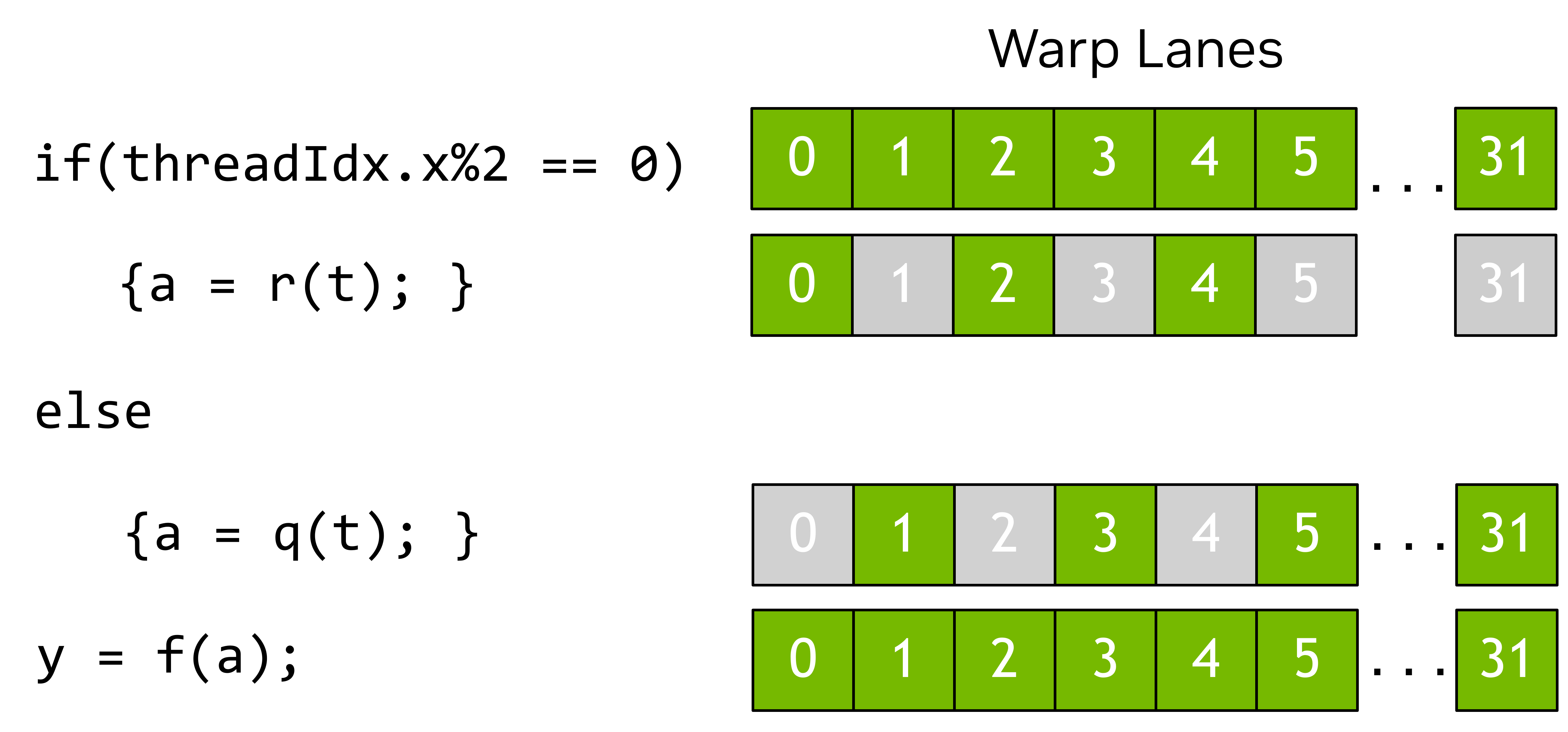
Active vs inactive lanes in a warp. Inactive lanes (diverged threads) are masked off — they consume time but produce no output. Source: NVIDIA
7.2 Warp Divergence¶
When threads in a warp take different branches, they execute both paths serially — inactive lanes are masked off.
__global__ void divergent(float* data, int N) {
    int i = blockIdx.x * blockDim.x + threadIdx.x;
    if (i % 2 == 0)    // ← half the warp goes here
        data[i] *= 2.0f;
    else               // ← other half goes here (serialized!)
        data[i] += 1.0f;
}

// Result: warp takes TWO passes — both branches run, half masked each time
// 2× slower than a non-divergent version
How the GPU actually handles this — predication and SEL:
CUDA hardware can convert short branches into predicated instructions. Instead of branching, the GPU executes both paths and uses a SEL (select) instruction to pick the correct result. This is the hardware equivalent of branchless selection — and the compiler does it automatically for simple cases.
Approach 1 — Ternary operator (recommended):
This looks like branching code, but the compiler generates branchless SASS assembly because the operations are trivial:
__global__ void branchless_ternary(float* data, int N) {
    int i = blockIdx.x * blockDim.x + threadIdx.x;
    if (i < N) {
        float val  = data[i];
        float even = val * 2.0f;      // compute BOTH results
        float odd  = val + 1.0f;
        data[i] = (i % 2 == 0) ? even : odd;  // compiler emits SEL, not branch
    }
}
The NVCC compiler sees that both paths are cheap (one multiply, one add) and emits a predicated SEL instruction instead of a conditional jump. All 32 threads in the warp execute in lockstep — no divergence.
Approach 2 — Arithmetic select (manual branchless):
If you want to guarantee branchless execution regardless of compiler decisions:
__global__ void branchless_arithmetic(float* data, int N) {
    int i = blockIdx.x * blockDim.x + threadIdx.x;
    if (i < N) {
        float val  = data[i];
        float even = val * 2.0f;
        float odd  = val + 1.0f;
        int is_even = 1 - (i & 1);     // 1 if even, 0 if odd — no branch
        data[i] = is_even * even + (1 - is_even) * odd;  // pure arithmetic
    }
}
Both values are computed, then blended with integer masks — zero branches at any level.
How CUDA differs from CPU here:
| CPU (x86 SIMD) | GPU (CUDA) | |
|---|---|---|
| Default branch handling | Branch instruction + branch predictor | Automatic predication for short branches |
| Making it branchless | Requires manual SIMD blend intrinsics (_mm256_blendv_ps) |
Compiler does it automatically for ternary/simple if |
| When divergence hurts | Branch misprediction penalty (~15 cycles) | Warp serialization (executes both paths, 2× time) |
| Branchless payoff | Always faster than misprediction | Only faster when both paths are cheap |
When NOT to use branchless:
If the two paths are expensive (e.g., complex loops, function calls), computing both paths wastes work. Better to let the warp diverge and only execute the needed path:
// DON'T make this branchless — computing heavy_func for all threads wastes cycles
if (condition)
    result = heavy_function_A(x);   // 100+ instructions
else
    result = heavy_function_B(x);   // 100+ instructions

// Divergence serializes (2× time) but only does NEEDED work
// Branchless would do ALL work for ALL threads (2× work × all threads)
Rule of thumb: branchless for single-instruction operations (mul, add, max, min). Let the compiler handle ternary operators. Use arithmetic select only if profiling shows the compiler didn't predicate.
Verify with SASS inspection:
# Compile to SASS and check for branch vs SEL instructions
nvcc -arch=sm_87 -Xptxas=-v --ptx my_kernel.cu
cuobjdump --dump-sass my_kernel.o | grep -E "BRA|SEL|@P"
# SEL = select (branchless)  ✓
# BRA = branch (divergent)   ✗
# @P = predicated instruction ✓
When divergence is unavoidable: if (i < N) bounds checks diverge only the last partial warp — acceptable.
7.3 Occupancy — Hiding Latency¶
The GPU hides memory latency by switching to other resident warps while one warp waits. More resident warps = more latency hiding = higher throughput.
SM capacity: 2048 resident threads (H100) = 64 warps
If block size = 256 → 8 warps/block → 8 blocks resident per SM
If block size = 32  → 1 warp/block  → 64 blocks resident per SM (but tiny blocks waste overhead)
If block size = 1024 → 32 warps/block → 2 blocks = 64 warps = 100% occupancy
Occupancy is limited by: 1. Registers per thread — more registers = fewer threads fit 2. Shared memory per block — more shared mem = fewer blocks fit 3. Max threads per SM — hard limit
Find optimal config programmatically:
int block_size, min_grid;
cudaOccupancyMaxPotentialBlockSize(&min_grid, &block_size, my_kernel, 0, 0);
printf("Optimal block size: %d\n", block_size);

// Query actual occupancy
int active_blocks;
cudaOccupancyMaxActiveBlocksPerMultiprocessor(&active_blocks, my_kernel, block_size, 0);
float occupancy = (active_blocks * block_size) / (float)props.maxThreadsPerMultiProcessor;
printf("Occupancy: %.1f%%\n", occupancy * 100);
8. Memory Coalescing¶
Global memory is accessed in 128-byte cache line chunks. If 32 threads in a warp access 32 contiguous floats (128 bytes), that's one memory transaction. If they access scattered addresses, that's up to 32 transactions — 32× slower.
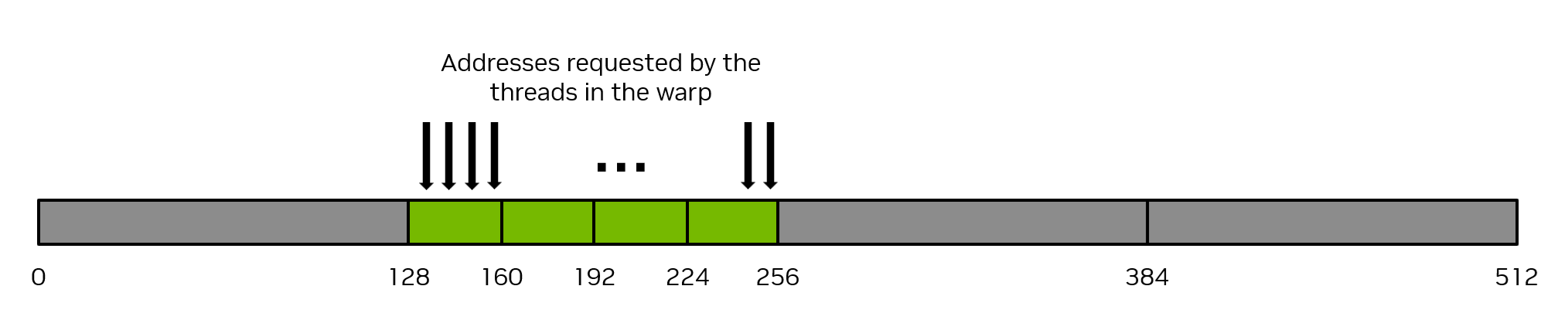
32 threads access 32 consecutive 4-byte floats → 1 transaction (128 bytes). Source: NVIDIA

Scattered accesses → multiple transactions, wasted bandwidth. Source: NVIDIA
Coalesced (good):
// Thread i accesses a[i] — consecutive, perfectly coalesced
__global__ void coalesced(float* a, float* b, float* c, int N) {
    int i = blockIdx.x * blockDim.x + threadIdx.x;
    if (i < N) c[i] = a[i] + b[i];
}
Strided (bad):
// Thread i accesses a[i * stride] — stride = 4 means 1/4 cache lines used
__global__ void strided(float* a, float* b, float* c, int stride, int N) {
    int i = blockIdx.x * blockDim.x + threadIdx.x;
    if (i * stride < N) c[i] = a[i * stride] + b[i * stride];
}
// Each 128-byte load fetches 32 floats, but only uses 1 → 97% wasted bandwidth
Fix strided access with transpose or SoA layout (see AoS vs SoA in SIMD guide).
9. Shared Memory and Bank Conflicts¶
Shared memory is divided into 32 banks, each 4 bytes wide. Bank k holds addresses k, k+32, k+64, etc.
If multiple threads in a warp access different addresses in the same bank, that's a bank conflict — serialized. If all threads access the same address in one bank, it's a broadcast — no conflict.
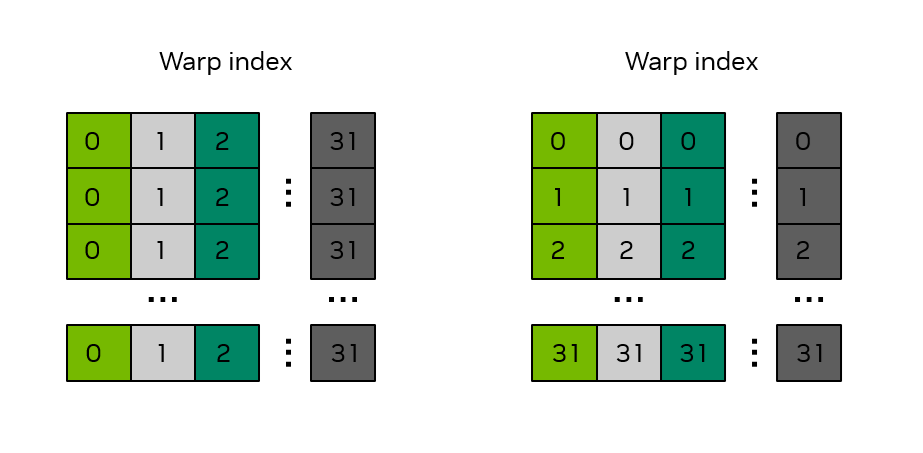
Source: NVIDIA CUDA Programming Guide
// No conflict: thread i accesses bank i
__shared__ float smem[32];
float val = smem[threadIdx.x];          // OK: thread 0→bank 0, thread 1→bank 1, ...

// 2-way bank conflict: thread 0 and 16 both access bank 0
float val = smem[threadIdx.x * 2];     // BAD: stride 2 → 2-way conflict

// Fix: pad the array
__shared__ float smem[32 + 1];         // +1 pad shifts all addresses
float val = smem[threadIdx.x * 2];     // Now stride-2 is conflict-free

// 32-way conflict (broadcast): all threads read the same element
float val = smem[0];                   // OK — hardware broadcasts, no conflict
Matrix transpose (classic bank conflict example):
#define TILE 32

__global__ void transpose(float* out, const float* in, int width, int height) {
    __shared__ float tile[TILE][TILE + 1];   // +1 padding avoids conflicts

    int x = blockIdx.x * TILE + threadIdx.x;
    int y = blockIdx.y * TILE + threadIdx.y;

    if (x < width && y < height)
        tile[threadIdx.y][threadIdx.x] = in[y * width + x];   // coalesced read

    __syncthreads();

    x = blockIdx.y * TILE + threadIdx.x;
    y = blockIdx.x * TILE + threadIdx.y;

    if (x < height && y < width)
        out[y * height + x] = tile[threadIdx.x][threadIdx.y]; // coalesced write
}
9.1 Shared Memory Is Actually Flat¶
The GPU sees shared memory as one long line of addresses. When you declare __shared__ float tile[32][32], the GPU doesn't know about "rows" and "columns" — it's just 1,024 consecutive floats.
What the GPU sees (flat):
  smem[0]  smem[1]  smem[2]  ...  smem[31]  smem[32]  smem[33]  ...  smem[1023]
  ├──────── Row 0 (32 elements) ──────────┤ ├──────── Row 1 ──────────────────┤

What YOU see (2D grid):
  Row 0:  smem[0]   smem[1]   smem[2]  ...  smem[31]
  Row 1:  smem[32]  smem[33]  smem[34] ...  smem[63]
  Row 2:  smem[64]  smem[65]  smem[66] ...  smem[95]

Index formula:  flat_index = row × width + col
Banks are assigned by the flat index: bank = flat_index % 32.
9.2 Why Column Access Causes Bank Conflicts¶
When a warp of 32 threads reads one row (consecutive elements), each thread hits a different bank — no conflict:
Row access: thread i reads smem[row][i] = smem[row × 32 + i]

  Thread 0 → index 0  → Bank 0
  Thread 1 → index 1  → Bank 1
  Thread 2 → index 2  → Bank 2
  ...
  Thread 31 → index 31 → Bank 31

  All 32 banks hit once → no conflict ✓
But when threads read one column (same col, different rows), every thread hits the same bank:
Column access: thread i reads smem[i][col] = smem[i × 32 + col]

  Width = 32 (no padding):
  Thread 0 → index 0×32 + 0 = 0   → Bank 0 % 32 = 0
  Thread 1 → index 1×32 + 0 = 32  → Bank 32 % 32 = 0  ← SAME BANK!
  Thread 2 → index 2×32 + 0 = 64  → Bank 64 % 32 = 0  ← SAME BANK!
  Thread 3 → index 3×32 + 0 = 96  → Bank 96 % 32 = 0  ← SAME BANK!

  → 32-way bank conflict! Serialized to 32 sequential accesses.
  → 32× slower than conflict-free access.
9.3 The +1 Padding Fix — Visually¶
Adding one padding element per row changes the width from 32 to 33. Now column accesses hit different banks:
__shared__ float tile[32][32 + 1];   // width = 33

Column access with padding:
  Thread 0 → index 0×33 + 0 = 0   → Bank 0 % 32 = 0
  Thread 1 → index 1×33 + 0 = 33  → Bank 33 % 32 = 1   ← different!
  Thread 2 → index 2×33 + 0 = 66  → Bank 66 % 32 = 2   ← different!
  Thread 3 → index 3×33 + 0 = 99  → Bank 99 % 32 = 3   ← different!

  → All 32 threads hit different banks → no conflict ✓
The complete picture:
Without padding (width = 32):              With padding (width = 33):

Col 0 access:                              Col 0 access:
  Row 0: index  0 → Bank 0                  Row 0: index  0 → Bank 0
  Row 1: index 32 → Bank 0  ← conflict!     Row 1: index 33 → Bank 1  ✓
  Row 2: index 64 → Bank 0  ← conflict!     Row 2: index 66 → Bank 2  ✓
  Row 3: index 96 → Bank 0  ← conflict!     Row 3: index 99 → Bank 3  ✓

Col 5 access:                              Col 5 access:
  Row 0: index  5 → Bank 5                  Row 0: index  5 → Bank 5
  Row 1: index 37 → Bank 5  ← conflict!     Row 1: index 38 → Bank 6  ✓
  Row 2: index 69 → Bank 5  ← conflict!     Row 2: index 71 → Bank 7  ✓
  Row 3: index101 → Bank 5  ← conflict!     Row 3: index104 → Bank 8  ✓
Cost of padding: 1 extra float per row (128 bytes for 32 rows). Trivial cost, 32× speedup for column access. Always pad when your tile width is a multiple of 32.
9.4 Bank Conflict Patterns Quick Reference¶
| Access pattern | Bank conflict | Fix |
|---|---|---|
smem[threadIdx.x] (stride 1) |
None | Already perfect |
smem[threadIdx.x * 2] (stride 2) |
2-way | Pad or remap |
smem[threadIdx.x * 32] (column, width 32) |
32-way (worst!) | +1 padding |
smem[same_index] (broadcast) |
None | Hardware broadcasts |
smem[row][threadIdx.x] (row read) |
None | Natural row-major |
smem[threadIdx.x][col] (column read) |
32-way | Declare as [N][N+1] |
9.5 Row Access vs Column Access — CUDA Examples¶
Row access (safe, no conflicts):
// Every thread reads a different column in the SAME row → stride 1 → no conflict
__shared__ float tile[32][32];

int col = threadIdx.x;   // each thread picks a different column
float val = tile[0][col]; // row 0, varying column

// Thread 0 → tile[0][0]  = flat index 0  → Bank 0
// Thread 1 → tile[0][1]  = flat index 1  → Bank 1
// Thread 2 → tile[0][2]  = flat index 2  → Bank 2
// ...
// Thread 31 → tile[0][31] = flat index 31 → Bank 31
// ✓ All 32 banks hit → no conflict → full speed
Row access is like kids taking lockers in order: locker 0, 1, 2, 3 → smooth flow. No padding needed.
Column access (conflicts, needs fix):
// Every thread reads a different ROW in the SAME column → stride 32 → 32-way conflict!
__shared__ float tile[32][32];

int row = threadIdx.x;    // each thread picks a different row
float val = tile[row][0]; // varying row, column 0

// Thread 0 → tile[0][0]  = flat index 0   → Bank 0
// Thread 1 → tile[1][0]  = flat index 32  → Bank 0  ← SAME!
// Thread 2 → tile[2][0]  = flat index 64  → Bank 0  ← SAME!
// Thread 3 → tile[3][0]  = flat index 96  → Bank 0  ← SAME!
// ✗ All threads hit Bank 0 → 32-way conflict → serialized → 32× slower
Column access is like all kids jumping to the same locker pattern: locker 0, 32, 64 → traffic jam.
Column access with +1 padding (fixed):
// Same column access, but width = 33 instead of 32
__shared__ float tile[32][33];   // ← +1 padding

int row = threadIdx.x;
float val = tile[row][0];

// Thread 0 → flat index 0×33 + 0 = 0   → Bank 0
// Thread 1 → flat index 1×33 + 0 = 33  → Bank 1  ← different!
// Thread 2 → flat index 2×33 + 0 = 66  → Bank 2  ← different!
// Thread 3 → flat index 3×33 + 0 = 99  → Bank 3  ← different!
// ✓ All different banks → no conflict → full speed
// Cost: 1 extra float per row (128 bytes total) — trivial
9.6 Complete Example — Matrix Transpose with Bank Conflict Fix¶
Matrix transpose is the classic use case: you read rows (safe) but write columns (conflict). The +1 padding makes both directions conflict-free.
#define TILE 32

__global__ void transpose_naive(float* out, const float* in, int W, int H) {
    // BAD: column write causes 32-way bank conflict
    __shared__ float tile[TILE][TILE];

    int x = blockIdx.x * TILE + threadIdx.x;
    int y = blockIdx.y * TILE + threadIdx.y;

    if (x < W && y < H)
        tile[threadIdx.y][threadIdx.x] = in[y * W + x];    // row write ✓

    __syncthreads();

    x = blockIdx.y * TILE + threadIdx.x;
    y = blockIdx.x * TILE + threadIdx.y;

    if (x < H && y < W)
        out[y * H + x] = tile[threadIdx.x][threadIdx.y];   // column read ✗ CONFLICT!
}

__global__ void transpose_padded(float* out, const float* in, int W, int H) {
    // GOOD: +1 padding eliminates column bank conflicts
    __shared__ float tile[TILE][TILE + 1];   // ← the fix

    int x = blockIdx.x * TILE + threadIdx.x;
    int y = blockIdx.y * TILE + threadIdx.y;

    if (x < W && y < H)
        tile[threadIdx.y][threadIdx.x] = in[y * W + x];    // row write ✓

    __syncthreads();

    x = blockIdx.y * TILE + threadIdx.x;
    y = blockIdx.x * TILE + threadIdx.y;

    if (x < H && y < W)
        out[y * H + x] = tile[threadIdx.x][threadIdx.y];   // column read ✓ (padded)
}

// Performance difference on Orin Nano Super (1024×1024 matrix):
//   transpose_naive:  ~15 GB/s effective bandwidth
//   transpose_padded: ~85 GB/s effective bandwidth  (5.6× faster!)
9.7 Advanced — Shared Memory Swizzling¶
For production kernels (CUTLASS, cuBLAS), +1 padding wastes memory and misaligns addresses. Instead, they use swizzling — XOR the row index into the column address to scatter bank accesses without wasting space.
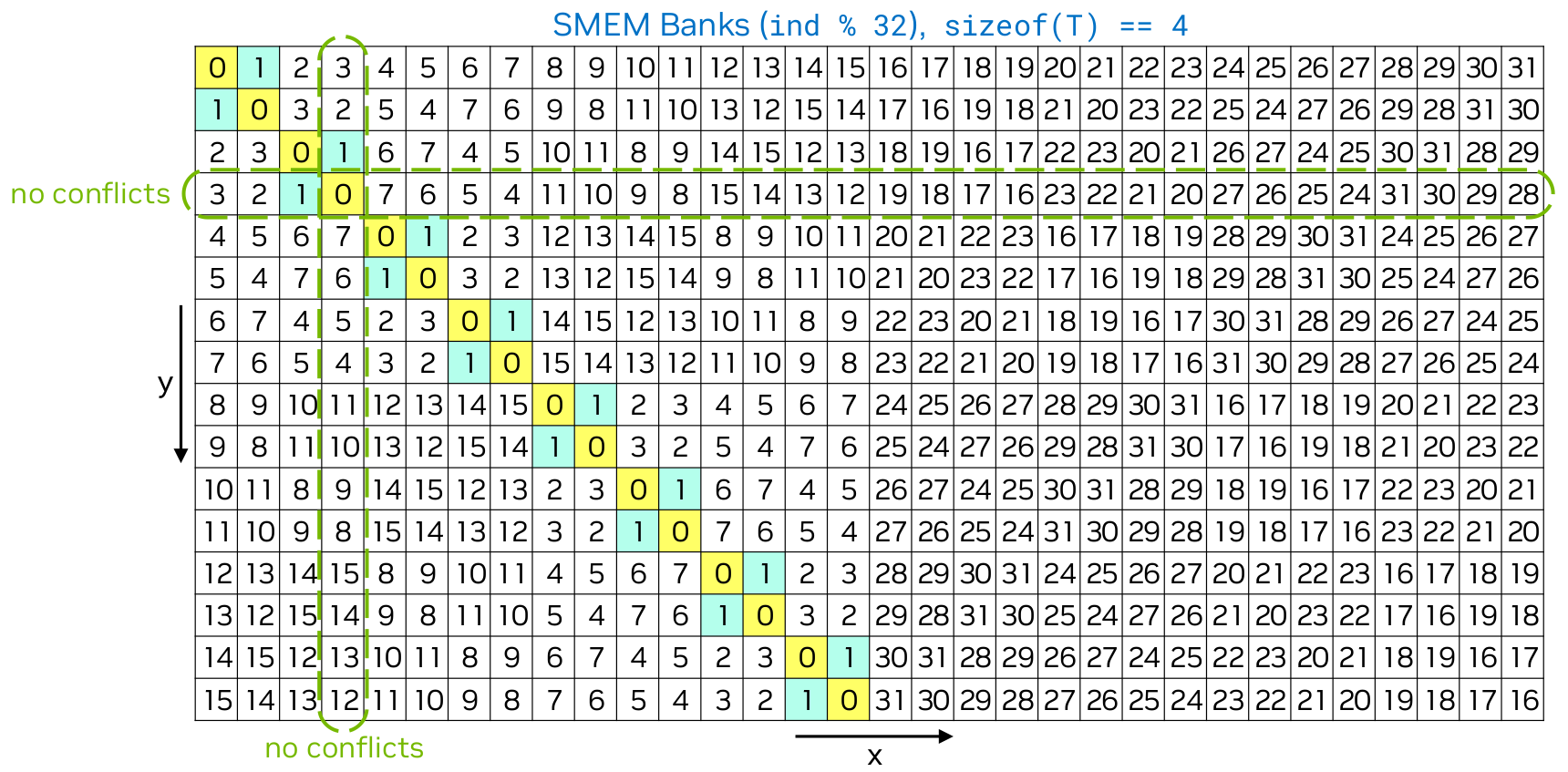
Swizzling remaps addresses so that column accesses automatically land on different banks, without padding. Source: Lei Mao's blog.
// Swizzled access: XOR row bits into column index
// Instead of:  tile[row][col]
// Use:         tile[row][col ^ (row % num_banks)]

// Example for 32 banks:
int swizzled_col = col ^ (row & 31);
float val = tile[row][swizzled_col];

// Row 0, col 0: 0 ^ 0 = 0  → Bank 0
// Row 1, col 0: 0 ^ 1 = 1  → Bank 1
// Row 2, col 0: 0 ^ 2 = 2  → Bank 2
// Row 3, col 0: 0 ^ 3 = 3  → Bank 3
// No padding needed, no wasted memory, no alignment issues.
Swizzling is used internally by CUTLASS and cuBLAS. For your own kernels, +1 padding is simpler and nearly as effective.
9.8 When You Need Padding vs When You Don't¶
| Situation | Padding needed? | Why |
|---|---|---|
| Reading rows from shared memory | No | Threads access consecutive addresses → all different banks |
| Writing rows to shared memory | No | Same reason — stride 1 is always safe |
| Reading columns from shared memory | Yes | Threads access stride-32 → all same bank |
| Writing columns to shared memory | Yes | Same reason |
| Matrix transpose (read row, write col) | Yes | The write side has column access |
| Tiled matmul (A tile read by row) | No | Row access is natural |
| Tiled matmul (B tile read by column) | Yes | B is often accessed column-wise in the K loop |
| Already using swizzling | No | Swizzling handles it without padding |
Rule of thumb: if any access pattern in your kernel has threads reading the same column (or any stride that's a multiple of 32), add +1 to the last dimension. Cost: negligible. Benefit: up to 32× speedup for that access.
10. Synchronization¶
Three levels of synchronization, each with different scope and cost:
| Function | Scope | Cost | When to use |
|---|---|---|---|
__syncthreads() |
Thread block (all threads) | High | After shared memory writes, before reads |
__syncwarp() |
Warp (32 threads) | Low | Fast coordination within one warp |
__syncwarp(mask) |
Sub-warp (selected lanes) | Very low | Divergent execution paths |
10.1 __syncthreads() — Block-Wide Barrier¶
All threads in a thread block must reach this point before any thread continues. The most common synchronization primitive in CUDA.
__global__ void block_sync_example(float* input, float* output) {
    __shared__ float shared[256];
    int tid = threadIdx.x;
    int idx = blockIdx.x * blockDim.x + tid;

    // Step 1: every thread loads one element into shared memory
    shared[tid] = input[idx];

    // Step 2: BARRIER — wait for ALL threads to finish writing
    __syncthreads();

    // Step 3: now safe — all 256 values are in shared memory
    // Thread 0 can read shared[255] because thread 255 has finished writing
    if (tid == 0) {
        float sum = 0.0f;
        for (int i = 0; i < blockDim.x; i++)
            sum += shared[i];
        output[blockIdx.x] = sum;
    }
}
Without __syncthreads(): thread 0 might read shared[200] before thread 200 has written it → garbage result. The barrier guarantees all writes complete before any reads.
Critical rule — __syncthreads() in conditional code is undefined behavior:
// WRONG: some threads may not reach __syncthreads()
if (threadIdx.x < 16) {
    smem[threadIdx.x] = data[threadIdx.x];
    __syncthreads();   // ← UB: threads 16–31 never reach this → DEADLOCK
}

// CORRECT: barrier outside the conditional
smem[threadIdx.x] = (threadIdx.x < 16) ? data[threadIdx.x] : 0;
__syncthreads();       // all threads hit this — safe
10.2 __syncwarp() — Warp Barrier¶
Synchronizes only the 32 threads in one warp. Faster than __syncthreads() because no cross-warp coordination needed.
__global__ void warp_sync_example(int* data) {
    int tid = threadIdx.x;
    int lane = tid % 32;         // lane within warp

    int val = data[tid];

    // Warp-level computation
    val += 1;

    // Sync only this warp's 32 threads
    __syncwarp();

    // Now all 32 lanes in this warp have updated val
    // Safe to use warp shuffle operations
    int neighbor = __shfl_xor_sync(0xFFFFFFFF, val, 1);  // exchange with neighbor
    data[tid] = val + neighbor;
}
When to use: warp shuffle operations (__shfl_sync), warp vote (__ballot_sync), or any warp-cooperative algorithm where you need to ensure all lanes have finished a prior step.
10.3 __syncwarp(mask) — Partial Warp Sync¶
Synchronizes only the lanes specified by the bitmask. Avoids forcing inactive lanes to wait.
__global__ void masked_sync_example(int* data) {
    int tid = threadIdx.x;
    int lane = tid % 32;

    int val = data[tid];

    bool active = (lane % 2 == 0);  // only even lanes participate

    if (active) {
        val += 10;  // only even lanes modify
    }

    // Mask: 0xAAAAAAAA = 10101010... (bits set for even lanes: 0, 2, 4, ...)
    // Wait: 0x55555555 would be odd lanes
    unsigned even_mask = 0x55555555;  // lanes 0, 2, 4, 6, ...
    __syncwarp(even_mask);

    if (active) {
        data[tid] = val;  // only even lanes write — guaranteed they all finished
    }
}
When to use: branch-divergent algorithms where only some lanes are active (graph traversal, sparse matrix operations, conditional AI inference paths). Avoids the overhead of syncing lanes that aren't participating.
10.4 Synchronization in Tiled Matmul (Real Pattern)¶
The most common sync pattern in AI kernels — load tile, sync, compute, sync, repeat:
__global__ void matmul_tiled(float* A, float* B, float* C, int N) {
    __shared__ float As[TILE][TILE];
    __shared__ float Bs[TILE][TILE];
    float sum = 0.0f;

    for (int t = 0; t < N / TILE; t++) {
        // Phase 1: ALL threads cooperatively load one tile
        As[threadIdx.y][threadIdx.x] = A[...];
        Bs[threadIdx.y][threadIdx.x] = B[...];

        __syncthreads();   // ← BARRIER 1: tile fully loaded before compute

        // Phase 2: ALL threads compute using the loaded tile
        for (int k = 0; k < TILE; k++)
            sum += As[threadIdx.y][k] * Bs[k][threadIdx.x];

        __syncthreads();   // ← BARRIER 2: compute done before loading next tile
    }
    // Two barriers per tile iteration — load/compute/load/compute...
    C[...] = sum;
}
Why two barriers per iteration: - Barrier 1: ensures tile is fully loaded before any thread reads from it - Barrier 2: ensures all threads finished reading before the tile is overwritten with the next chunk
Missing either barrier → race condition → wrong results (often intermittent, hard to debug).
10.5 Warp Shuffle — Pass Data Between Threads Without Shared Memory¶
Warp shuffles are the most powerful warp-level primitive. They let threads exchange register values directly — no shared memory, no barrier, no memory traffic. Just register-to-register communication across lanes.
The four shuffle operations:
// 1. Direct lane read: "give me value from thread src_lane"
float val = __shfl_sync(0xFFFFFFFF, my_val, src_lane);
//   Every thread gets the value from thread src_lane
//   Example: __shfl_sync(mask, my_val, 0) → all threads get thread 0's value

// 2. Shift down: thread i gets value from thread i+delta
float val = __shfl_down_sync(0xFFFFFFFF, my_val, delta);
//   Lane 0 gets Lane delta's value, Lane 1 gets Lane (1+delta)'s value, ...
//   Lanes at the end (i+delta >= 32) get their own value (no wrap)

// 3. Shift up: thread i gets value from thread i-delta
float val = __shfl_up_sync(0xFFFFFFFF, my_val, delta);

// 4. XOR exchange: thread i gets value from thread (i XOR lane_mask)
float val = __shfl_xor_sync(0xFFFFFFFF, my_val, lane_mask);
//   Example: mask=1 → exchange with neighbor (0↔1, 2↔3, ...)
//   Example: mask=16 → exchange with lane 16 apart (0↔16, 1↔17, ...)
Why shuffles beat shared memory:
| Shared memory | Warp shuffle | |
|---|---|---|
| Latency | ~5 cycles (shared mem read) | ~1 cycle (register crossbar) |
| Sync needed | Yes (__syncthreads) |
No (warp is already lockstep) |
| Memory used | Shared memory (limited, 48 KB) | Registers only (unlimited for this) |
| Bank conflicts | Possible | Impossible |
| Scope | Entire block | Within one warp (32 threads) |
10.6 Warp Reduction — The Classic Pattern¶
Sum all 32 values in a warp using shuffle-down in 5 steps (log₂(32) = 5):
__device__ float warp_reduce_sum(float val) {
    for (int offset = 16; offset > 0; offset >>= 1)
        val += __shfl_down_sync(0xFFFFFFFF, val, offset);
    return val;   // lane 0 has the sum of all 32 lanes
}
Step-by-step (simplified to 8 lanes for clarity):
Initial:    lane: 0  1  2  3  4  5  6  7
            val:  a  b  c  d  e  f  g  h

Step 1 (offset=4):  each lane += value from lane+4
            lane 0: a+e    lane 1: b+f    lane 2: c+g    lane 3: d+h
            lane 4: e      lane 5: f      lane 6: g      lane 7: h

Step 2 (offset=2):  each lane += value from lane+2
            lane 0: a+e+c+g    lane 1: b+f+d+h
            lane 2: c+g        lane 3: d+h

Step 3 (offset=1):  each lane += value from lane+1
            lane 0: a+b+c+d+e+f+g+h  ← SUM OF ALL VALUES
            lane 1: b+f+d+h

Result: lane 0 = sum(all 8 values) in just 3 steps (log₂(8))
For 32 lanes: 5 steps (log₂(32))
No shared memory used. No __syncthreads(). Just 5 __shfl_down_sync calls.
10.7 Block Reduction — Warp + Shared Memory Hybrid¶
For reducing across an entire block (256+ threads), combine warp shuffles with shared memory:
__device__ float block_reduce_sum(float val) {
    // Step 1: reduce within each warp (shuffle, no shared mem)
    val = warp_reduce_sum(val);

    // Step 2: collect warp results into shared memory
    __shared__ float warp_results[8];   // one slot per warp (256 threads / 32 = 8 warps)
    int lane = threadIdx.x % 32;
    int warp = threadIdx.x / 32;

    if (lane == 0)
        warp_results[warp] = val;       // lane 0 of each warp writes its sum
    __syncthreads();

    // Step 3: first warp reduces the 8 warp results
    if (warp == 0) {
        val = (lane < 8) ? warp_results[lane] : 0.0f;
        val = warp_reduce_sum(val);     // 8 values → 1 final sum
    }

    return val;  // thread 0 has the block sum
}
Why this is optimal: only ONE __syncthreads() call (after writing to shared memory). The warp-level reductions use zero shared memory and zero barriers. This is the pattern used in cuBLAS, CUTLASS, and FlashAttention.
10.8 Hardware Warp Reductions (Ampere+ / SM 8.0+)¶
On compute capability 8.0+, the GPU has dedicated reduction hardware:
// Built-in warp reductions (one instruction, fastest possible)
float sum = __reduce_add_sync(0xFFFFFFFF, val);
float max = __reduce_max_sync(0xFFFFFFFF, val);
float min = __reduce_min_sync(0xFFFFFFFF, val);

// Integer versions
int   isum = __reduce_add_sync(0xFFFFFFFF, ival);
int   imax = __reduce_max_sync(0xFFFFFFFF, ival);

// Bitwise
unsigned and_result = __reduce_and_sync(0xFFFFFFFF, uval);
unsigned or_result  = __reduce_or_sync(0xFFFFFFFF, uval);
These are single hardware instructions — even faster than the shuffle loop. Use them when available (Orin Nano = SM 8.7 → supported).
10.9 Warp Vote — Collective Boolean Operations¶
// Do ALL active lanes satisfy the predicate?
bool all_done = __all_sync(0xFFFFFFFF, my_flag);

// Does ANY lane satisfy the predicate?
bool any_ready = __any_sync(0xFFFFFFFF, data_available);

// Get a bitmask of which lanes satisfy the predicate
unsigned mask = __ballot_sync(0xFFFFFFFF, val > threshold);
// mask bit i = 1 if lane i's (val > threshold) is true
// Example: mask = 0x0000FF00 → lanes 8–15 passed, others didn't

// Count how many lanes passed
int count = __popc(mask);   // population count (count set bits)
Use cases in AI:
- Attention masking: __ballot_sync to find which tokens are valid
- Early exit: __all_sync(mask, converged) — stop iterating when all lanes converge
- Sparse operations: __popc(__ballot_sync(...)) — count non-zero elements in warp
10.10 When to Use What¶
| Need | Best primitive | Why |
|---|---|---|
| Sum/max/min of 32 values | __reduce_add_sync (SM 8.0+) |
Single hardware instruction |
| Sum/max/min on older GPUs | __shfl_down_sync loop (5 steps) |
Works everywhere |
| Exchange with neighbor | __shfl_xor_sync(mask, val, 1) |
Butterfly pattern |
| Broadcast one value to all lanes | __shfl_sync(mask, val, src_lane) |
Read from specific lane |
| Prefix sum (scan) | __shfl_up_sync loop |
Build partial sums |
| Count true conditions | __ballot_sync + __popc |
Bitmask + popcount |
| Check all/any convergence | __all_sync / __any_sync |
Collective boolean |
| Block-wide reduction | Warp shuffle + 1 shared mem step | Hybrid (section 10.7) |
| Cross-block reduction | atomicAdd to global |
Only option |
10.11 Atomic Operations¶
// Atomic add (global or shared memory)
atomicAdd(&counter, 1);
atomicAdd(&shared_sum, val);

// Other atomics
atomicSub(&counter, 1);
atomicMax(&max_val, val);
atomicMin(&min_val, val);
atomicCAS(&lock, 0, 1);      // compare-and-swap: if *lock==0, set to 1, return old

// FP16 atomics (SM 7.0+)
atomicAdd((__half*)ptr, (__half)val);
Performance tip: never do atomicAdd from every thread. First reduce within warp (shuffle), then reduce within block (shared mem), then ONE thread per block does the atomic:
// BAD: 10,000 threads all doing atomicAdd → massive contention
atomicAdd(out, val);

// GOOD: reduce first, one atomic per block
float block_sum = block_reduce_sum(val);
if (threadIdx.x == 0)
    atomicAdd(out, block_sum);   // only 1 atomic per block, not 256
11. Streams and Asynchronous Execution¶
Streams allow overlapping GPU computation with host execution and with data transfers.
cudaStream_t stream1, stream2;
cudaStreamCreate(&stream1);
cudaStreamCreate(&stream2);

// Overlapping compute and copy
cudaMemcpyAsync(d_a, h_a, bytes, cudaMemcpyHostToDevice, stream1);
kernel<<<grid, block, 0, stream1>>>(d_a, d_out, N);
cudaMemcpyAsync(h_out, d_out, bytes, cudaMemcpyDeviceToHost, stream1);

// Different work on stream2, runs concurrently with stream1
other_kernel<<<grid, block, 0, stream2>>>(d_b, d_out2, N);

// Synchronize
cudaStreamSynchronize(stream1);   // wait for stream1
cudaStreamSynchronize(stream2);   // wait for stream2

cudaStreamDestroy(stream1);
cudaStreamDestroy(stream2);
Stream timeline (overlapping copy + compute):
Stream 1:  [copy H→D] [kernel] [copy D→H]
Stream 2:             [copy H→D] [kernel] [copy D→H]
           ─────────────────────────────────────────► time
Events for precise timing and cross-stream sync:
cudaEvent_t start, stop;
cudaEventCreate(&start);
cudaEventCreate(&stop);

cudaEventRecord(start, stream1);
kernel<<<grid, block, 0, stream1>>>(args);
cudaEventRecord(stop, stream1);

cudaEventSynchronize(stop);
float ms;
cudaEventElapsedTime(&ms, start, stop);
printf("Kernel time: %.3f ms\n", ms);

cudaEventDestroy(start);
cudaEventDestroy(stop);
12. How It All Connects — The GPU Performance Stack¶
Sections 12–19 cover many GPU features. Before diving in, here's how they all fit together as four layers of GPU performance, from top (CPU-side) to bottom (hardware limits):
Layer 1: CPU ↔ GPU Scheduling
  ┌─────────────────────────────────────────────────────┐
  │  CUDA Graphs (§13)         — remove CPU launch overhead      │
  │  Streams (§11)             — overlap copy + compute          │
  │  Automatic Scalability (§19) — same code, any GPU size       │
  └─────────────────────────────────────────────────────┘
                              │
Layer 2: Kernel Memory Efficiency
  ┌─────────────────────────────────────────────────────┐
  │  Tiled Matmul (§15)        — load once, reuse TILE× times   │
  │  Reduction (§14)           — collapse N values in log(N) steps│
  │  Shared Memory (§9)        — on-chip staging, bank conflicts │
  │  Coalesced Access (§8)     — minimize DRAM transactions      │
  └─────────────────────────────────────────────────────┘
                              │
Layer 3: Intra-Warp Efficiency
  ┌─────────────────────────────────────────────────────┐
  │  Warp Shuffle (§10.5)      — register-to-register, no memory│
  │  Warp Reduction (§10.6-8)  — 5-step sum, no shared memory   │
  │  Warp Vote (§10.9)         — ballot/all/any for branching    │
  │  Branchless/Predication (§7.2) — avoid warp divergence       │
  └─────────────────────────────────────────────────────┘
                              │
Layer 4: Hardware Accelerators
  ┌─────────────────────────────────────────────────────┐
  │  Tensor Cores (§16)        — 16×16 matrix in one instruction │
  │  Thread Block Clusters (§4.3) — distributed shared memory   │
  │  Cooperative Groups (§18)  — flexible sync at any granularity│
  │  Dynamic Parallelism (§17) — GPU launches GPU (niche)        │
  └─────────────────────────────────────────────────────┘
                              │
                              ▼
              ┌──────────────────────────────┐
              │  Roofline Limit (§20)         │
              │  Performance = min(           │
              │    compute peak,             │
              │    memory bandwidth × AI     │
              │  )                            │
              │  You can't exceed this —     │
              │  only get closer to it.      │
              └──────────────────────────────┘
How to use this stack when debugging performance:
Is your kernel slow?
│
├── Step 1: Is CPU the bottleneck?
│   └── Yes → CUDA Graphs (§13). Eliminates ~5 µs/launch overhead.
│        Graphs don't make GPU faster — they make CPU overhead disappear.
│
├── Step 2: Is it memory-bound?
│   └── Yes → Tiling (§15). Load once from DRAM, reuse 16–128× from shared memory.
│        Every DRAM read you eliminate = direct speedup.
│        Check coalescing (§8): thread N must access address N.
│
├── Step 3: Is synchronization the bottleneck?
│   └── Yes → Warp shuffles (§10.5) replace __syncthreads + shared memory.
│        Shuffle = 1 cycle, register-only. Shared mem = 5 cycles + sync.
│        Block reduction → warp shuffle first, ONE shared mem step (§10.7).
│
├── Step 4: Is warp divergence hurting?
│   └── Yes → Branchless arithmetic (§7.2). Ternary → compiler emits SEL.
│        Sort input data so adjacent threads take same path.
│
├── Step 5: Is compute underutilized?
│   └── Yes → Tensor Cores (§16). One MMA instruction = 16×16×16 FMAs.
│        WMMA fragments must be 16-aligned. Use cuBLAS for automatic TC.
│
└── Step 6: Still slow?
    └── Roofline (§20). Calculate arithmetic intensity.
         If AI < ridge point → bandwidth-limited → quantize, fuse, batch.
         If AI > ridge point → compute-limited → more Tensor Cores, wider tiles.
         You cannot exceed the roofline — only approach it.
Key insight: most AI kernels are memory-bound (left of the roofline ridge). This means: - Tiling and data reuse (Layer 2) give the biggest speedups - Warp shuffles (Layer 3) save shared memory bandwidth - Tensor Cores (Layer 4) only help when you're compute-bound (large batches, prefill) - CUDA Graphs (Layer 1) help when many small kernels dominate
13. CUDA Graphs¶
For workloads that repeat the same sequence of kernels and transfers, CUDA graphs eliminate per-launch CPU overhead by capturing and replaying the entire execution graph.
// Step 1: capture a sequence of operations
cudaGraph_t graph;
cudaStreamBeginCapture(stream, cudaStreamCaptureModeGlobal);

kernel_a<<<grid, block, 0, stream>>>(d_a, N);
kernel_b<<<grid, block, 0, stream>>>(d_a, d_b, N);
cudaMemcpyAsync(h_out, d_b, bytes, cudaMemcpyDeviceToHost, stream);

cudaStreamEndCapture(stream, &graph);

// Step 2: instantiate (compile the graph)
cudaGraphExec_t graph_exec;
cudaGraphInstantiate(&graph_exec, graph, nullptr, nullptr, 0);

// Step 3: launch repeatedly (minimal CPU overhead)
for (int iter = 0; iter < 1000; iter++) {
    cudaGraphLaunch(graph_exec, stream);
    cudaStreamSynchronize(stream);
}

// Cleanup
cudaGraphExecDestroy(graph_exec);
cudaGraphDestroy(graph);
When to use graphs: - Same kernel sequence repeated many times (training loops, inference batches) - Many small kernels where launch overhead dominates - CPU overhead reduction from ~5 µs/launch → ~1 µs/graph replay
14. Parallel Reduction — Complete Example¶
Reduction is the canonical shared memory + sync pattern.
// Parallel sum reduction — each block reduces its chunk to one value
__global__ void reduce_sum(const float* in, float* partial, int N) {
    extern __shared__ float smem[];

    int tid = threadIdx.x;
    int gid = blockIdx.x * blockDim.x * 2 + threadIdx.x;  // × 2: each thread loads 2

    // Load two elements per thread
    float val = 0.0f;
    if (gid < N)         val += in[gid];
    if (gid + blockDim.x < N) val += in[gid + blockDim.x];
    smem[tid] = val;
    __syncthreads();

    // Tree reduction in shared memory
    for (int stride = blockDim.x / 2; stride > 32; stride >>= 1) {
        if (tid < stride)
            smem[tid] += smem[tid + stride];
        __syncthreads();
    }

    // Final warp reduction (no sync needed within a warp)
    if (tid < 32) {
        volatile float* s = smem;   // volatile prevents compiler from caching
        s[tid] += s[tid + 32];
        s[tid] += s[tid + 16];
        s[tid] += s[tid + 8];
        s[tid] += s[tid + 4];
        s[tid] += s[tid + 2];
        s[tid] += s[tid + 1];
    }

    // Thread 0 writes this block's partial sum
    if (tid == 0) partial[blockIdx.x] = smem[0];
}

// Host: launch reduce_sum, then sum the partial results
float gpu_sum(const float* d_in, int N) {
    int block = 256;
    int grid  = (N + block * 2 - 1) / (block * 2);

    float *d_partial;
    cudaMalloc(&d_partial, grid * sizeof(float));

    reduce_sum<<<grid, block, block * sizeof(float)>>>(d_in, d_partial, N);

    // Recursively reduce if needed, or just copy partial to host and sum there
    std::vector<float> h_partial(grid);
    cudaMemcpy(h_partial.data(), d_partial, grid * sizeof(float), cudaMemcpyDeviceToHost);
    cudaFree(d_partial);

    return std::accumulate(h_partial.begin(), h_partial.end(), 0.0f);
}
15. Tiled Matrix Multiply — Shared Memory Optimization¶
#define TILE_SIZE 16

__global__ void tiled_matmul(
    const float* A, const float* B, float* C,
    int M, int N, int K)  // C[M×N] = A[M×K] * B[K×N]
{
    __shared__ float As[TILE_SIZE][TILE_SIZE];
    __shared__ float Bs[TILE_SIZE][TILE_SIZE];

    int row = blockIdx.y * TILE_SIZE + threadIdx.y;
    int col = blockIdx.x * TILE_SIZE + threadIdx.x;

    float sum = 0.0f;

    // Iterate over tiles of K
    for (int t = 0; t < (K + TILE_SIZE - 1) / TILE_SIZE; t++) {
        // Cooperative load: each thread loads one element
        int a_col = t * TILE_SIZE + threadIdx.x;
        int b_row = t * TILE_SIZE + threadIdx.y;

        As[threadIdx.y][threadIdx.x] = (row < M && a_col < K) ? A[row * K + a_col] : 0.0f;
        Bs[threadIdx.y][threadIdx.x] = (b_row < K && col < N) ? B[b_row * N + col]  : 0.0f;
        __syncthreads();

        // Compute partial dot product for this tile
        for (int k = 0; k < TILE_SIZE; k++)
            sum += As[threadIdx.y][k] * Bs[k][threadIdx.x];
        __syncthreads();
    }

    if (row < M && col < N)
        C[row * N + col] = sum;
}
Why tiling works:
Naive matmul:
  Each C[i][j] loads K elements from A (row i) and K from B (col j)
  Total global loads: M*N*2K = O(MNK) → memory bound for large K

Tiled matmul with TILE=16:
  Each 16×16 block of C cooperatively loads one 16×16 tile from A and B
  Each load reused 16 times within the tile
  Memory traffic reduced by ~TILE_SIZE = 16×
  Compute:memory ratio increased → compute bound (much faster)
16. Tensor Cores¶
Tensor Cores are dedicated matrix-multiply-accumulate units introduced in Volta (CC 7.0). They operate on small matrix tiles in a single instruction.
#include <mma.h>
using namespace nvcuda::wmma;

// Tensor Core: 16×16×16 GEMM (FP16 input, FP32 accumulator)
__global__ void tensor_core_matmul(
    const half* A, const half* B, float* C, int M, int N, int K)
{
    fragment<matrix_a, 16, 16, 16, half, row_major> a_frag;
    fragment<matrix_b, 16, 16, 16, half, col_major> b_frag;
    fragment<accumulator, 16, 16, 16, float>         c_frag;

    fill_fragment(c_frag, 0.0f);

    for (int k = 0; k < K; k += 16) {
        load_matrix_sync(a_frag, A + blockIdx.y * 16 * K + k, K);
        load_matrix_sync(b_frag, B + k * N + blockIdx.x * 16, N);
        mma_sync(c_frag, a_frag, b_frag, c_frag);   // D = A*B + C
    }

    store_matrix_sync(C + blockIdx.y * 16 * N + blockIdx.x * 16, c_frag, N, mem_row_major);
}
Tensor Core throughput vs CUDA Cores (H100 SXM, per SM):
| Precision | CUDA Cores | Tensor Cores |
|---|---|---|
| FP64 | 67 TFLOPS | 134 TFLOPS |
| TF32 | — | 989 TFLOPS |
| FP16/BF16 | 134 TFLOPS | 1,979 TFLOPS |
| FP8 | — | 3,958 TFLOPS |
| INT8 | 268 TOPS | 3,958 TOPS |
In practice: use cuBLAS or cuDNN — they use Tensor Cores automatically when shapes are multiples of 16.
17. Dynamic Parallelism¶
Kernels can launch other kernels from the GPU (no CPU round-trip required):
__global__ void child_kernel(float* data, int n) {
    int i = blockIdx.x * blockDim.x + threadIdx.x;
    if (i < n) data[i] *= 2.0f;
}

__global__ void parent_kernel(float* data, int N) {
    // Each block launches its own child kernel
    int chunk = N / gridDim.x;
    int offset = blockIdx.x * chunk;

    child_kernel<<<1, chunk>>>(data + offset, chunk);
    cudaDeviceSynchronize();   // wait for children (device-side sync)
}
Requires compute capability 3.5+. Adds latency per launch. Best for irregular recursive problems (trees, AMR meshes).
18. Cooperative Groups¶
Cooperative groups let you express sync and reduction at any granularity — warp, block, multi-block, or grid.
#include <cooperative_groups.h>
namespace cg = cooperative_groups;

__global__ void flexible_reduction(float* data, float* out, int N) {
    auto block = cg::this_thread_block();  // all threads in this block
    auto warp  = cg::tiled_partition<32>(block);  // this warp
    auto tile  = cg::tiled_partition<4>(block);   // group of 4 threads

    float val = data[block.thread_rank()];

    // Warp reduce
    for (int i = warp.size() / 2; i > 0; i >>= 1)
        val += warp.shfl_down(val, i);

    // Write warp result
    if (warp.thread_rank() == 0)
        atomicAdd(out, val);
}

// Grid-wide sync (requires cudaLaunchCooperativeKernel)
__global__ void grid_sync_kernel(float* data) {
    auto grid = cg::this_grid();
    // ... do phase 1 ...
    grid.sync();   // all threads in grid synchronize
    // ... do phase 2 ...
}
19. Automatic Scalability¶
CUDA programs scale automatically across different GPU sizes. The same grid runs on a GPU with 4 SMs or 144 SMs — the runtime schedules blocks to available SMs.
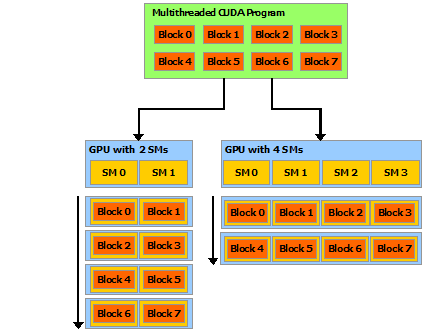
The same program scales automatically: 2 SMs run 2 blocks at a time, 4 SMs run 4 blocks at a time. Source: NVIDIA
This is why you write for maximum parallelism and let the hardware decide — don't hardcode grid sizes to a specific GPU.
20. Performance Optimization Checklist¶
Step 1 — Profile First¶
# NVIDIA Nsight Systems (timeline, CPU/GPU overlap)
nsys profile --stats=true ./my_program

# NVIDIA Nsight Compute (kernel-level metrics)
ncu --set full ./my_program
Step 2 — Roofline Analysis¶
Every kernel is either compute-bound or memory-bound:
Arithmetic Intensity (AI) = FLOPs / bytes accessed
                                                         │ Tensor Core roof (3958 TFLOPS)
Performance (FLOP/s)                                     │
     ╔═══════════════════════════════════════════════════╗
     ║ memory-bound │               compute-bound        ║
     ║  AI < ridge  │           AI > ridge point         ║
     ╚══════════════╧═══════════════════════════════════╝
                ridge ← Memory BW (3.35 TB/s) / Peak FLOPS

H100 ridge point: ~3,958 TFLOPS / 3,350 GB/s ≈ 1.18 FLOP/byte
If your kernel's AI < 1.18 FLOP/byte on H100 → it's memory-bound → focus on coalescing and reuse.
Step 3 — Common Optimizations¶
| Issue | Symptom | Fix |
|---|---|---|
| Low occupancy | Kernel uses many registers | Reduce register pressure; use __launch_bounds__ |
| Uncoalesced access | High DRAM traffic in Nsight | Restructure to SoA; transpose before processing |
| Bank conflicts | Shared mem replay in Nsight | Pad shared arrays (+1 column) |
| Warp divergence | Low warp execution efficiency | Branchless arithmetic; sort inputs first |
| Too many atomics | High contention | Use per-warp/per-block local accumulators first |
| Launch overhead | Kernel takes < 50 µs but lots of launches | Use CUDA Graphs |
| CPU-GPU idle time | GPU idle in timeline | Async transfers + streams |
Step 4 — Launch Bounds¶
// Tell the compiler max threads per block and min blocks per SM
// Helps compiler tune register allocation for better occupancy
__launch_bounds__(256, 4)   // max 256 threads/block, at least 4 blocks/SM
__global__ void my_kernel(float* data, int N) { ... }
21. Compute Capability Quick Reference¶
| Arch | CC | GPU Examples | FP16 TC | BF16 | FP8 | TMA | Clusters |
|---|---|---|---|---|---|---|---|
| Volta | 7.0 | V100 | ✓ | — | — | — | — |
| Turing | 7.5 | RTX 2080, T4 | ✓ | — | — | — | — |
| Ampere | 8.0 | A100 | ✓ | ✓ | — | — | — |
| Ampere | 8.6 | RTX 3090, A10 | ✓ | ✓ | — | — | — |
| Hopper | 9.0 | H100 | ✓ | ✓ | ✓ | ✓ | ✓ |
| Blackwell | 10.x | B100, B200 | ✓ | ✓ | ✓ | ✓ | ✓ |
| Vera | 12.x | Vera | ✓ | ✓ | ✓ | ✓ | ✓ |
SM resource limits (selected):
| Resource | Volta 7.0 | Ampere 8.0 | Hopper 9.0 |
|---|---|---|---|
| Max warps/SM | 64 | 64 | 64 |
| Max threads/SM | 2048 | 2048 | 2048 |
| Max blocks/SM | 32 | 32 | 32 |
| Registers/SM | 64K | 64K | 64K |
| Shared mem/SM | 96 KB | 164 KB | 228 KB |
| L2 cache | 6 MB | 40 MB | 50 MB |
| CUDA cores/SM | 64 FP64 | 64 FP64 | 64 FP64 |
| FP32 cores/SM | 64 | 128 | 128 |
22. Suggested Projects (in order)¶
| # | Project | Key Skills |
|---|---|---|
| 1 | Vector add / SAXPY | Launch config, indexing, bounds check, H↔D copy |
| 2 | Parallel reduction (sum) | Shared memory, __syncthreads, tree reduction, warp shuffles |
| 3 | 2D grayscale transform | 2D threadIdx/blockIdx, image stride |
| 4 | Matrix transpose | Shared memory, bank conflict padding |
| 5 | Naive matmul → tiled matmul | Tiling, shared mem reuse, compare vs cuBLAS |
| 6 | Histogram | Atomics, per-block private histogram, reduce-merge |
| 7 | Prefix scan | Blelloch scan, upsweep/downsweep in shared mem |
| 8 | Multi-stream pipeline | Streams, async copy, overlap compute + transfer |
Keep CPU golden references for every kernel. Validate before optimizing.
Resources¶
| Resource | What it covers |
|---|---|
| CUDA C++ Programming Guide | The authoritative reference — thread hierarchy, memory, streams, graphs |
| CUDA C++ Best Practices Guide | Optimization strategies, memory patterns, profiling |
| NVIDIA Nsight Compute | Kernel profiler — roofline, memory, warp stats |
| NVIDIA Nsight Systems | System profiler — CPU/GPU timeline, stream overlap |
| Hopper Architecture In-Depth | H100 SM, TMA, FP8, Thread Block Clusters |
| Ampere Architecture In-Depth | A100 SM, MIG, sparsity, TF32 |
| CUDA Samples | Reference implementations: reduction, matmul, scan |
| Programming Massively Parallel Processors (Hwu, Kirk, Hajj) | GPU architecture + CUDA optimization textbook |
Next¶
→ OpenCL and SYCL — portable compute across vendors.