Lecture 3 - The Zigbee stack: ZDO, APS, endpoints, and clusters
Course: Zigbee guide | Phase 2 - Embedded Software, IoT
Previous: Lecture 02 - Roles, topology, and network formation | Next: Lecture 04 - Security, commissioning, sleepy devices, and OTA
Why this lecture feels hard
This is the lecture where Zigbee often stops feeling simple.
Up to now, the story is easy:
- devices join a network
- some devices route
- some devices sleep
Then Zigbee starts throwing around words like:
NWKAPSZDOZCL- endpoint
- cluster
and everything starts to sound like spec language.
So this lecture uses one simple analogy all the way through.
Official reference: Silicon Labs The Zigbee Stack
Imagine a huge house party
Imagine you are throwing a huge house party.
Your house is full.
Your friends are spread across:
- your house
- the yard
- the garage
- your neighbor's house
Some people help pass messages around. Some people just show up, listen, and leave. Some people are in charge of the whole event.
That is a good mental model for Zigbee.
Now imagine you want one thing to happen:
- you press the wall switch
- the smart bulb turns on
To make that happen, the system has to answer four questions:
- How do we get the message there?
- Who exactly should receive it?
- What does the message mean?
- Who is in charge, and who is who?
Those four questions map to:
NWK= how do we get there?APS= who exactly should receive it?ZCL= what does the message mean?ZDO= who are you, and what are the rules?
If you remember only that mapping, the rest of Zigbee becomes much easier to read.
The stack in one picture
At a high level:
- PHY / MAC come from IEEE 802.15.4
- NWK handles network behavior and routing
- APS handles application-oriented delivery
- ZDO handles device identity, discovery, and management
- ZCL defines common application behavior
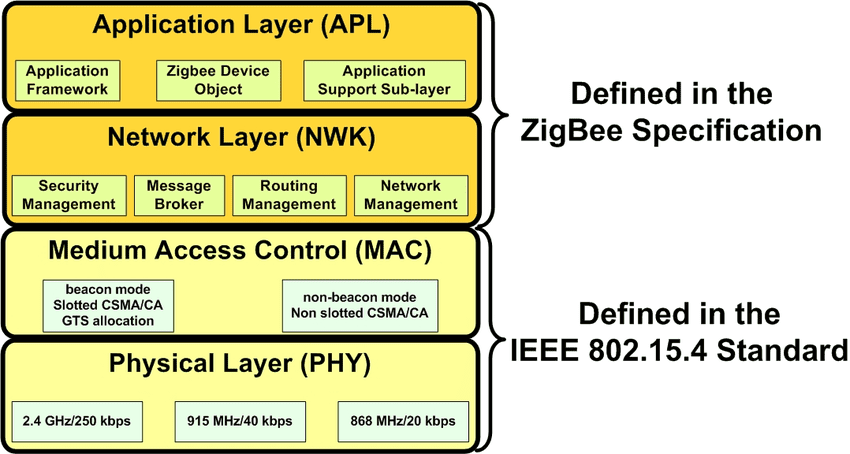
This picture is useful because it shows two important facts:
PHYandMACare the radio foundation from IEEE 802.15.4- Zigbee adds higher-level pieces that make devices understandable, not just reachable
Source: Electrical Technology ZigBee Architecture diagram
Meet the Zigbee party crew
1. NWK - the neighborhood map and hall monitors
NWK means Network Layer.
At the party, this is:
- the people who know the map
- the people who know which houses connect to which
- the people who pass notes through the best route
Their job is:
- know which device is reachable through which router
- forward the message hop by hop
- recover if one route stops working
So if a message has to travel like this:
- Switch -> Router A -> Router B -> Bulb
that is NWK doing its job.
Simple version:
NWKanswers: how do we get there?
2. APS - the mailroom and the address book
APS means Application Support Sublayer.
At the party, this is:
- the mailroom staff
- the people holding the address book
- the people who make sure the note goes to the right person in the right room
This matters because reaching the right house is not enough.
You also need to reach:
- the right device
- the right function inside that device
That is why APS works closely with:
- endpoints
- binding
- delivery behavior
Simple version:
APSanswers: who exactly should receive this?
3. ZCL - the shared party slang
ZCL means Zigbee Cluster Library.
At the party, this is:
- the shared slang everybody understands
You do not want every brand of bulb and switch speaking a different private language.
You want a common language like:
OnOffToggleMove to Level
That is what ZCL gives you.
It defines common behavior so different vendors can still cooperate.
Simple version:
ZCLanswers: what does this message mean?
4. ZDO - the host and the principal
ZDO means Zigbee Device Object.
At the party, this is:
- the host
- the principal
- the person checking the guest list
- the person introducing people
- the person deciding who plays which role
ZDO handles questions like:
- who are you?
- are you a Coordinator, Router, or End Device?
- what endpoints do you have?
- what kind of device are you?
- what can you do?
This is management and discovery, not normal user commands.
Simple version:
ZDOanswers: who are you, and what are the rules?
The most important support words
Before the full story, you need three more terms.
Node
A node is the physical device.
Examples:
- one bulb
- one wall switch
- one sensor
Endpoint
An endpoint is a logical application instance inside the device.
One physical node can expose:
- one endpoint for lighting
- another endpoint for sensing
So:
- node = the whole person at the party
- endpoint = the specific role that person is playing
Cluster
A cluster is a reusable feature block.
Examples:
On/OffLevel ControlTemperature Measurement
So:
- endpoint = which application instance
- cluster = which feature
Attributes and commands
Inside a cluster, you usually care about two things:
- attributes = state values
- commands = actions
Examples:
- an
On/Offcluster may support commands likeOn,Off, andToggle - a temperature cluster may expose an attribute like
Measured Value
This is the daily Zigbee model:
- read an attribute
- write an attribute
- send a command
That is more useful than thinking only:
- send packet
- receive packet
The full party flow
Now let us walk through one simple event:
- you press a Zigbee wall switch
- a Zigbee bulb turns on
Step 1: the devices are already at the party
The network already exists.
The Coordinator formed it earlier.
The switch joined.
The bulb joined.
So now everyone is "in the party."
Step 2: ZDO helps everyone understand who is who
Before useful control happens, devices need identity and discovery information.
The system needs to learn things like:
- this is the bulb
- this is the switch
- the bulb exposes a lighting endpoint
- the bulb supports the
On/Offcluster
This is ZDO territory.
It is not saying:
- turn on the light
It is saying:
- who are you and what do you support?
Step 3: the target endpoint is known
Suppose the bulb exposes:
- endpoint
1for lighting
Now the system knows not only:
- which node is the bulb
but also:
- which application instance inside the bulb should receive the lighting message
Step 4: the correct cluster is known
The bulb's endpoint 1 supports:
On/Off
Now the system knows:
- the right node
- the right endpoint
- the right cluster
Step 5: the switch creates a ZCL command
The user presses the switch.
The switch creates the standard application command:
On
That is a ZCL meaning.
It is not just raw bytes.
It is a standard command with shared meaning.
Step 6: APS addresses it properly
Now APS takes over.
APS makes sure the command is directed to:
- the correct destination node
- the correct destination endpoint
- the correct application target
This is the part that turns:
- "send this somewhere"
into:
- "send this lighting command to the bulb's light-control endpoint"
Step 7: NWK routes it through the mesh
If the bulb is not directly reachable, NWK finds the path.
For example:
- Switch -> Router A -> Router B -> Bulb
That is the routing story.
NWK does not decide what On means.
It only makes sure the message travels across the network.
Step 8: the bulb understands the command
The bulb receives the message.
Its application side sees:
- endpoint =
1 - cluster =
On/Off - command =
On
Now the bulb turns on.
That whole flow shows the layer split very clearly:
ZDOhelped identify devices and capabilitiesAPSmade sure the message reached the right application targetNWKgot the message there through the meshZCLgave the command meaning
Binding: the saved relationship
Binding is like keeping a saved relationship in the party address book.
Instead of asking every time:
- which bulb should this switch control?
the system can remember:
- this switch endpoint is bound to that bulb endpoint
That makes control cleaner and reduces repeated lookup work.
Simple version:
- binding = remember who talks to whom
Groups: one message for many devices
Groups are like a party group chat.
Instead of sending:
- one command to bulb A
- one command to bulb B
- one command to bulb C
you can send:
- one command to the "living room lights" group
Then all bulbs in that group respond.
Simple version:
- group = one message for many devices
Common confusion to avoid
Confusion 1: ZDO and ZCL sound similar
They are not doing the same job.
ZDO= identity, discovery, managementZCL= commands, attributes, application meaning
One asks:
- who are you?
The other says:
- turn on
Confusion 2: people skip APS
Beginners often think:
- the network sends the message
- the application receives it
But Zigbee is more structured than that.
APS is important because it handles delivery to the correct application target.
Confusion 3: node and endpoint are not the same
- node = physical device
- endpoint = logical application inside the device
One physical device can have multiple endpoints.
In one nutshell
For Zigbee:
NWK= how do we get there?APS= who exactly should receive this?ZCL= what does the message mean?ZDO= who are you, and what are the rules?
That is the whole lecture in one summary.
Why embedded engineers should care
In firmware, Zigbee is not just:
- initialize radio
- join network
- send bytes
It is more like:
- define endpoints
- pick clusters
- expose attributes
- support commands
- manage relationships between devices
That is why Zigbee feels more like building a structured device model than just pushing bits through a transport.
Lab
Use the party analogy on one device:
- smart bulb
- wall switch
- temperature sensor
Write down:
- what the physical node is
- what endpoint or endpoints it likely has
- which cluster matters most
- one attribute or command it likely supports
- one thing
ZDOwould help discover about it - one place where
APSmatters - one place where
NWKmatters
If you can explain your device using those seven steps, then the Zigbee stack is starting to become practical instead of abstract.
Previous: Lecture 02 - Roles, topology, and network formation | Next: Lecture 04 - Security, commissioning, sleepy devices, and OTA